Automate Customer Feedback Analysis: Tag and Route Comments in n8n
You can automate customer feedback analysis in n8n without any paid tool. The workflow reads each comment, tags its sentiment and topic, creates a follow-up task for unhappy customers and counts the themes for a weekly summary. We built it on a local n8n install and ran it on ten sample comments.
- Ten sample comments were tagged in one run: 5 positive, 1 neutral and 4 negative.
- All four negative comments became high priority follow-up tasks.
- Sentiment comes from the star rating and topics from keyword lists, so it is free and easy to explain.
- You can swap the tagging step for a language model later.
How to automate customer feedback analysis
Reading every comment does not scale, but ignoring them costs you customers. A simple pipeline solves both. It reads each comment, tags the sentiment and the topic, sends unhappy customers to a person and counts the themes for a weekly summary.
Our version is rule based. Sentiment comes from the star rating, and topics come from keywords. That keeps it free, fast and easy to explain.
| Topic tag | Keywords it looks for |
|---|---|
| Pricing | price, pricing, expensive, cost, value |
| Bug | bug, crash, error, broken, slow |
| Onboarding | setup, onboard, confusing, documentation, stuck |
| Support | support, ticket, response, reply, waiting |
| Feature request | would love, feature, wish |
Build the feedback workflow in n8n
Run n8n locally first. Our free n8n setup guide walks through it. Then add these nodes.
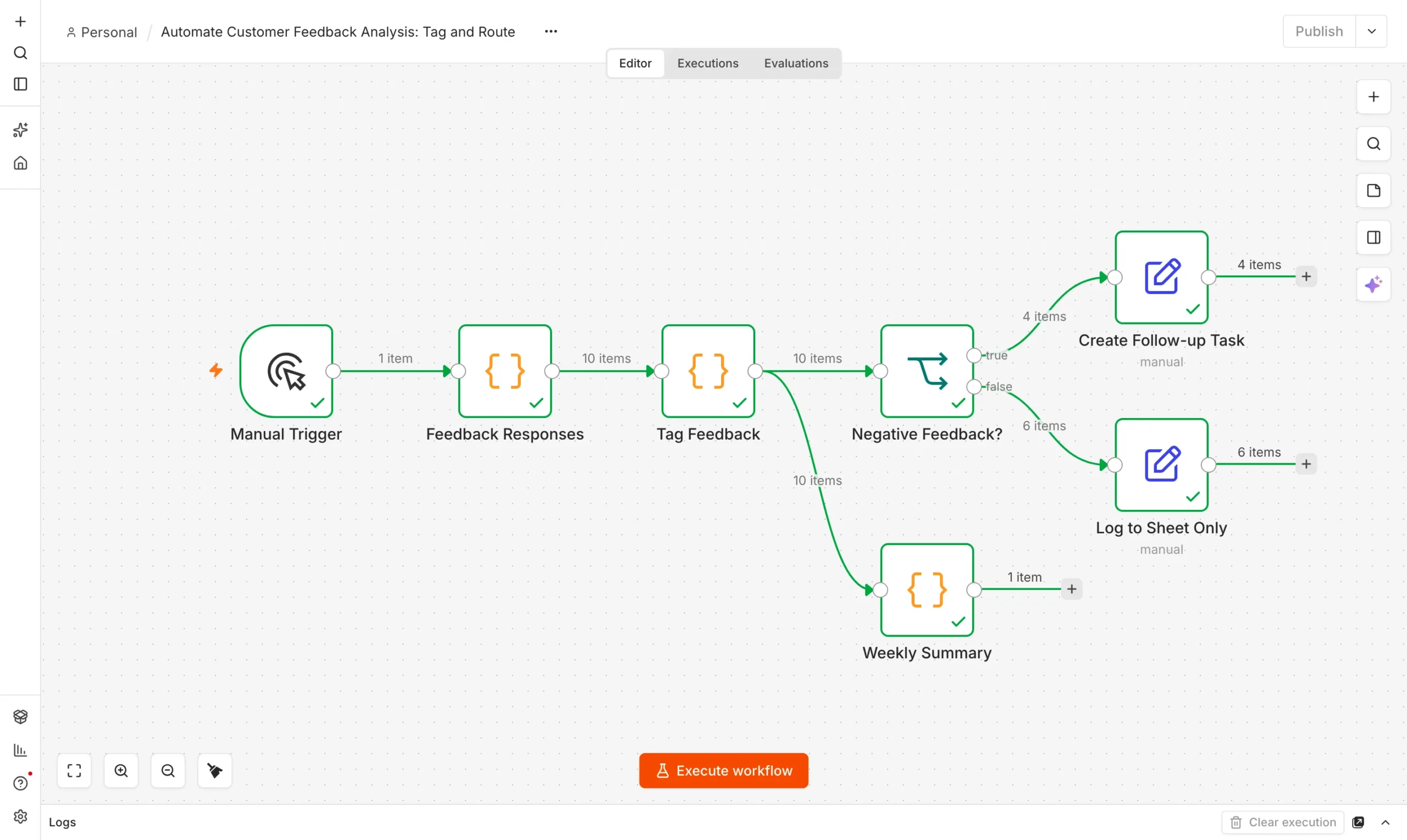
Feedback responses
A Code node returns ten sample comments with ratings.
Collect
Tag Feedback
A Code node sets sentiment, topic tags and priority.
Tag
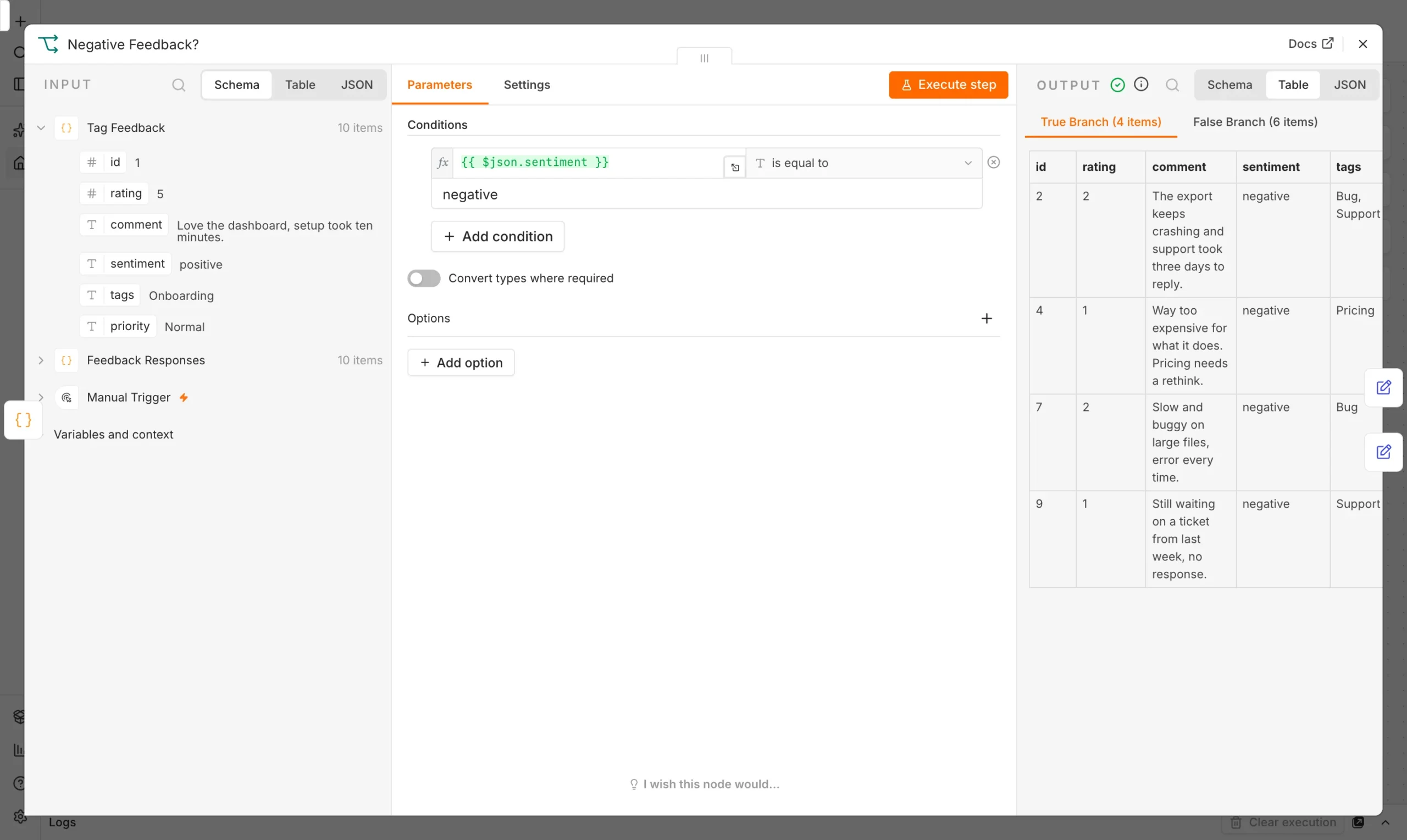
Negative?
An If node splits unhappy customers from the rest.
Route
Act and count
Set nodes create tasks or log rows, and a summary node counts themes.
Report
Sentiment is a rating check: 4 or 5 is positive, 3 is neutral and 1 or 2 is negative. Topics come from matching each comment against the keyword lists above.
const sentiment = x.rating >= 4 ? 'positive' : x.rating === 3 ? 'neutral' : 'negative';
const tags = Object.entries(topics)
  .filter(([, re]) => re.test(x.comment))
  .map(([k]) => k);
return { json: { ...x, sentiment, tags: tags.join(', ') || 'General',
                 priority: x.rating <= 2 ? 'High' : 'Normal' } };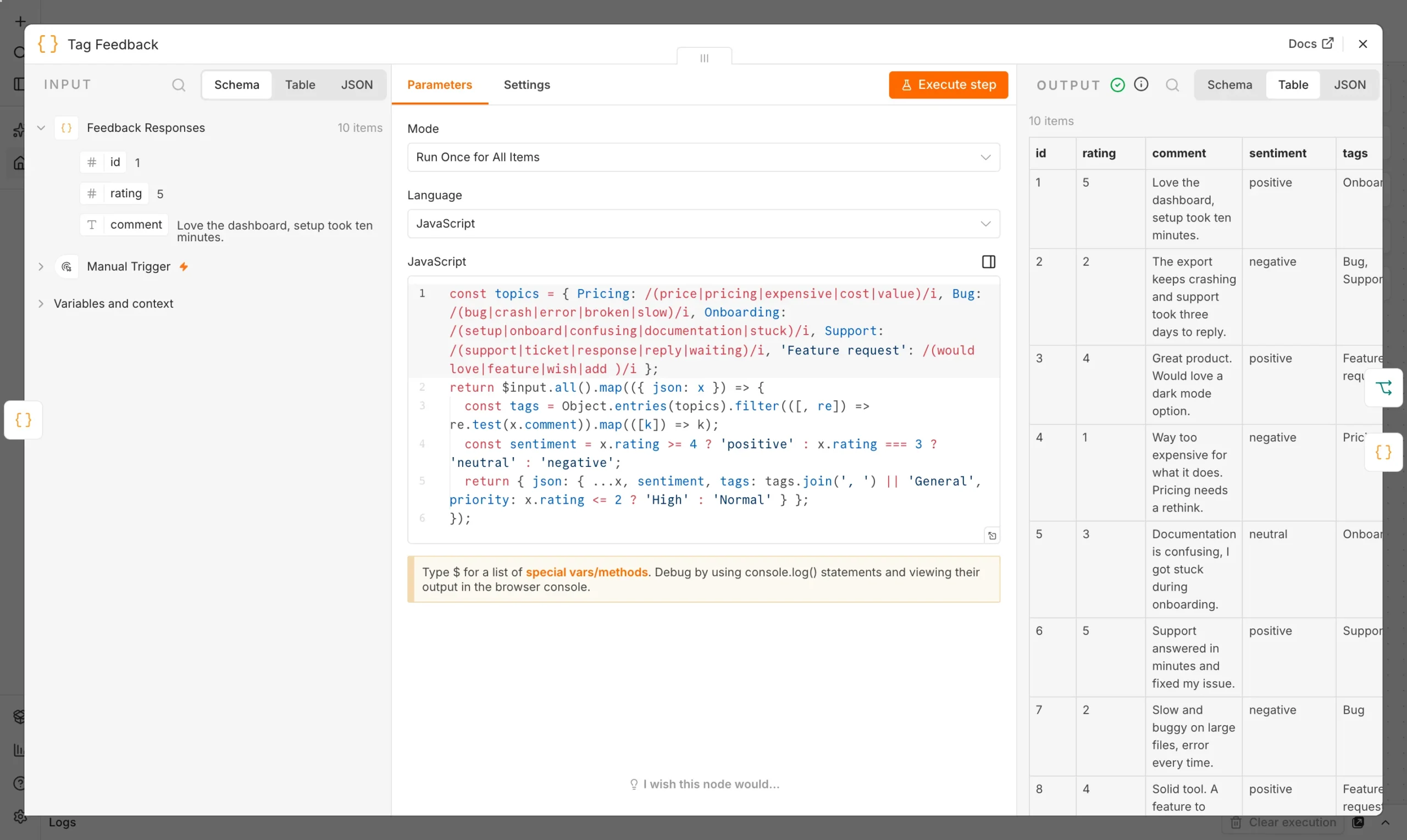
An If node then checks whether sentiment equals negative. True goes to a follow-up task, false goes to a log row, and a separate Code node counts everything for the weekly summary.
What happened when we ran it
We ran the workflow on ten sample comments. Every node finished with a green check. The If node sent 4 items down the true branch and 6 down the false branch.
| Result | Count |
|---|---|
| Positive comments | 5 |
| Neutral comments | 1 |
| Negative comments | 4 |
| Support topic | 3 |
| Pricing, Bug, Onboarding, Feature request | 2 each |
All four negative comments became high priority follow-up tasks. The summary also showed that support speed was the most common topic. That is exactly what customer feedback analysis should surface: patterns you miss when reading comments one by one.
The rules are not perfect. A comment about a fair price was tagged Pricing even though it was positive, which is why topic and sentiment are stored separately.
That separation is deliberate. Sentiment tells you how someone feels, while the topic tells you what they are talking about. Together they let you ask useful questions, such as which topic causes the most unhappy comments.
Limits of keyword-based customer feedback analysis
- Sarcasm and typos slip past keyword lists.
- Ratings can mislead. A 5-star comment can still contain a complaint.
- Upgrade later. Once the pipeline works, you can swap the tagging node for a language model without changing the rest.
To send unhappy customers straight to a person, connect this to our support ticket escalation workflow. For sorting incoming requests, see automate customer support.
What to do with the results
Customer feedback analysis is only useful if someone acts on it. Set a simple routine so the summary does not sit unread.
- Answer high priority tasks first. Aim to reply to every negative comment within one working day.
- Read the top topic weekly. The most common tag shows where customers struggle most.
- Log feature requests. A running list turns scattered wishes into a roadmap.
- Review the keyword lists monthly. Add the words your customers really use.
Frequently asked questions
Do I need AI for customer feedback analysis?
No. Star ratings and keyword rules cover the basics. AI helps with nuance, but you can add it later.
Where does the feedback come from?
Swap the sample node for a form, survey, sheet or helpdesk trigger. Keep the rating and comment fields.
Can it create tasks automatically?
Yes. Replace the follow-up Set node with a task, Slack or email node.