How to Generate Sales Leads: 12 Strategies and a Workflow That Follows Up in Seconds
To generate sales leads, define your ideal customer, choose two or three channels that fit your budget, capture every enquiry in one place, reply within minutes, and score each lead so your team calls the best ones first. Most guides stop at a list of channels. This one also shows how to automate capture, scoring and the first reply with a free n8n workflow that we built and tested end to end.
Key takeaways
- A sales lead is a person or company that has shown interest and fits your ideal customer profile (ICP).
- Use two or three channels, not twelve. Start with referrals, email outreach and one inbound channel.
- Speed matters. A study in Harvard Business Review found that companies that contacted online leads within an hour were nearly seven times as likely to reach a decision-maker as those that waited even one hour longer.
- Score every lead from 0 to 100 so hot leads reach a person in minutes. The n8n workflow below does this automatically and is free to self-host.
- Email outreach must follow the CAN-SPAM Act. The Federal Trade Commission lists penalties of up to $53,088 per violating email.
In this guide
- What is a sales lead?
- The 5-step lead generation engine
- 12 ways to generate sales leads
- Which strategies should you start with?
- How to qualify and score leads
- Automate capture and follow-up with n8n (step by step)
- Follow the rules: email and calling compliance
- Eight metrics that matter
- Your 30-day action plan
- Copy-and-paste templates
- Frequently asked questions
What is a sales lead?
A sales lead is a person or organization that has shown some interest in what you sell and matches the kind of customer you can serve well. An enquiry from a founder of a 60-person company who describes a clear problem and a deadline is a lead. A random email address collected from a list is only a contact.
Teams sort leads by how ready they are to buy. The labels differ slightly between companies, but these five are the ones you will meet most often:
| Lead type | What it means | Typical next step |
|---|---|---|
| Cold lead / contact | Fits your ICP but has not engaged with you yet | Personalized outreach (email, LinkedIn, referral intro) |
| Information-qualified lead (IQL) | Has given contact details, for example to download a guide | Nurture with useful content and a soft call to action |
| Marketing-qualified lead (MQL) | Has engaged repeatedly (pages viewed, emails opened, webinar attended) | Score it, then hand it to sales when it crosses your threshold |
| Sales-qualified lead (SQL) | Has budget, a need and a timeline that sales has confirmed | Discovery call and proposal |
| Product-qualified lead (PQL) | Has used your free trial or free plan in a way that signals buying intent | Personal outreach that references what they did in the product |
The 5-step lead generation engine
Every tactic in this guide belongs to one of five steps. Skipping a step is the most common reason lead generation feels like hard work with little to show for it.
Define your ideal customer
Who buys, why, and what they can spend.
Do once, revisit yearlyAttract with 2–3 channels
Referrals, email, content, partners, ads.
Strategies 1–12Capture in one place
Every form, chat and email lands in one list.
Webhook → CRMRespond in minutes
Speed decides who gets the conversation.
Automate this stepScore, nurture, close
Hot leads to sales, the rest to a nurture track.
Score 0–100- Define your ideal customer. Write one paragraph: industry, company size, the job title of the buyer, the problem you solve, what they can spend, and the trigger that makes them look for help (a new hire, a missed deadline, a funding round).
- Attract with two or three channels. Choose from the 12 strategies below based on your budget and how quickly you need results.
- Capture everything in one place. Website forms, chat messages, emails and event scans should all end up in the same list or CRM, with the source recorded.
- Respond in minutes. The first company to reply usually gets the conversation. This is the step to automate first.
- Score, nurture and close. Send hot leads to a person immediately and put everyone else on a helpful, low-pressure follow-up track.
12 ways to generate sales leads
Each strategy below has the same four parts: how it works, who it suits, how long it usually takes to produce leads, and the mistake to avoid. Time frames are typical ranges from small-business experience and will vary with your market.
1. Ask for referrals
Ask happy customers for an introduction at the moment they are most pleased with your work, such as right after a successful delivery. Be specific: name the type of person you want to meet instead of asking for “anyone you know”. Offer to write the introduction email yourself so it costs them almost nothing.
Best for: Service businesses and B2B companies with satisfied customers. Time to first leads: Days to a few weeks. Avoid: Asking too vaguely, or never asking at all.
2. Reconnect with past customers and lost deals
“No” often means “not now”. Every 90 to 180 days, review closed-lost deals and past customers and send a short, useful update: a new feature, a relevant case study or a note about a change in their industry. Past customers can also become repeat or expansion leads.
Best for: Any company with a sales history, however small. Time to first leads: Days. Avoid: Sending a generic newsletter instead of a personal note tied to their situation.
3. Cold email
Build a short list of people who match your ICP, write a brief message that names a problem you can solve, and follow up two or three times over two weeks. Start with 20 to 30 emails a day, measure replies, then scale. Set up SPF, DKIM and DMARC on your sending domain (our cold email deliverability guide includes a free checker) so messages reach the inbox, and follow the compliance rules later in this guide.
Best for: B2B companies with a clear buyer and a defined offer. Time to first leads: One to three weeks. Avoid: Sending large, untargeted batches. This damages your sender reputation and can breach the law.
4. LinkedIn outreach
Optimize your profile, connect with people who match your ICP, and start a real conversation before you pitch. Comment on their posts, share something useful, then suggest a short call. Keep it manual: LinkedIn’s User Agreement restricts bots and automated activity, so avoid tools that click and message for you.
Best for: B2B services, consulting, software and recruiting. Time to first leads: Two to six weeks. Avoid: Pitching in the first message, or using automation tools that risk your account.
5. Content and search (SEO)
Publish detailed answers to the questions your buyers type into Google, and give readers a next step such as a checklist, template or consultation. Content builds trust and keeps producing leads long after it is published.
Best for: Companies that can invest time and wait for compound results. Time to first leads: Three to six months or more. Avoid: Writing about your product instead of your buyer’s problem.
6. Optimize your website for lead capture
Give each important page one clear call to action. Keep forms short, since every extra field lowers completion. Add a thank-you page that tells visitors what happens next and how fast you will reply, and tag each submission with its source page.
Best for: Any business that already has website traffic. Time to first leads: Days after changes go live. Avoid: Long forms and a “we will be in touch” message with no time frame.
7. Chat and AI qualification on your site
A chat widget can answer common questions, ask two or three qualifying questions and book a meeting. Route anything complex to a human quickly, and review conversations weekly to learn what visitors really want.
Best for: Sites with steady traffic and repetitive pre-sales questions. Time to first leads: Days to weeks. Avoid: Letting a bot handle high-value conversations with no human handoff.
8. Webinars and events
A live session lets you show expertise and answer questions in real time. Record it and reuse the clips. At events, scan badges and record a note about each conversation so follow-up can be personal.
Best for: Complex or high-value products where buyers want to learn first. Time to first leads: Two to eight weeks including promotion. Avoid: Collecting attendee lists and never following up.
9. Partnerships and co-marketing
Team up with non-competing businesses that serve the same customers, for example an accountant and a bookkeeping software company. Swap introductions, co-host a webinar or agree on a referral fee.
Best for: Businesses with a defined niche. Time to first leads: Two to eight weeks. Avoid: Partnering with a competitor or with a business whose audience does not overlap yours.
10. Paid advertising
Search ads catch people who are already looking for a solution; social and LinkedIn ads help you reach a defined audience. Start with a small test budget, send traffic to a page built for one offer, and judge results by cost per qualified lead, not cost per click.
Best for: Businesses with a proven offer and a way to track leads. Time to first leads: Days. Avoid: Scaling spend before the offer and landing page convert.
11. Communities and forums
Join Slack groups, Discord servers, Reddit communities and industry forums where your buyers ask questions. Answer generously for weeks before mentioning what you sell, and follow each community’s self-promotion rules.
Best for: Software, agencies and specialist services. Time to first leads: One to three months. Avoid: Dropping links and leaving.
12. Free tools, calculators and trials
Interactive tools such as an ROI calculator, quiz or audit give visitors an instant, personal result in exchange for their email. Free trials and demos do the same for products.
Best for: Products with a measurable benefit or a free tier. Time to first leads: Weeks to build, then continuous. Avoid: Gating a tool that offers little value.
Strategy comparison at a glance
Use this table to compare the twelve options. The ratings are our editorial assessment of typical small-business results, not measured benchmarks.
| Strategy | Cost | Speed to first leads | Effort | Scales well |
|---|---|---|---|---|
| Referrals | Very low | Fast | Low | Medium |
| Reconnect with past customers | Very low | Fast | Low | Low |
| Cold email | Low | Fast | Medium | High |
| LinkedIn outreach | Low | Medium | Medium | Medium |
| Content and SEO | Medium | Slow | High | Very high |
| Website lead capture | Low | Fast | Low | High |
| Chat and AI qualification | Medium | Fast | Medium | High |
| Webinars and events | Medium | Medium | High | Medium |
| Partnerships | Low | Medium | Medium | High |
| Paid advertising | High | Fast | Medium | High |
| Communities | Very low | Slow | Medium | Low |
| Free tools and trials | Medium | Slow | High | Very high |
Which strategies should you start with?
Twelve channels is a menu, not a plan. Pick two or three that match your situation, run them for at least six weeks, and add another only when the first ones are working.
| Your situation | Start with | Add later |
|---|---|---|
| No budget, need leads this month | Referrals, reconnecting with past customers, cold email | Communities, LinkedIn outreach |
| Small budget, some website traffic | Website lead capture, referrals, one content topic per month | Partnerships, chat qualification |
| Established offer, marketing budget | Paid search, webinars, content | Free tools and trials, events |
| Long sales cycle, high-value deals | Referrals, partnerships, LinkedIn outreach | Webinars, account-based outreach |
How to qualify and score leads
Qualifying means checking whether a lead is worth a salesperson’s time. Three well-known frameworks give you a checklist:
- BANT: Budget, Authority, Need, Timeline. Simple and widely used.
- CHAMP: Challenges, Authority, Money, Prioritization. Starts from the buyer’s problem.
- MEDDIC: Metrics, Economic buyer, Decision criteria, Decision process, Identify pain, Champion. Suited to high-value, complex deals.
Lead scoring turns those checks into a number so the process can run automatically. Give points for signals that match your ICP and subtract points for signals that do not. We use a 100-point model in the workflow below:
Two design rules keep a scoring model honest. First, start with signals you can actually collect on a form: company size, budget, job title and a free-text message. Second, review your scores against real outcomes every quarter. If leads that scored 50 keep becoming customers, lower your threshold.
Automate capture and follow-up with n8n (step by step)
Speed to lead is the easiest win in this whole guide, and it is the step people are slowest to fix. Below is a complete workflow that receives a form submission, scores the lead, alerts your sales team for hot leads in seconds, and sends the right reply to every lead. We built and tested it on n8n 2.39 on a Mac, using Mailpit as a test inbox so no real emails were sent.
What you need: n8n (the free self-hosted version works; n8n Cloud does too), an SMTP account for sending email (for testing we used Mailpit), and a form that can send a POST request to a URL. No coding is required to import the finished workflow. Reading the scoring code is optional.
Download the workflow (JSON) and import it from the n8n editor menu with “Import from file”. After importing, open each email node and choose your own SMTP credential.
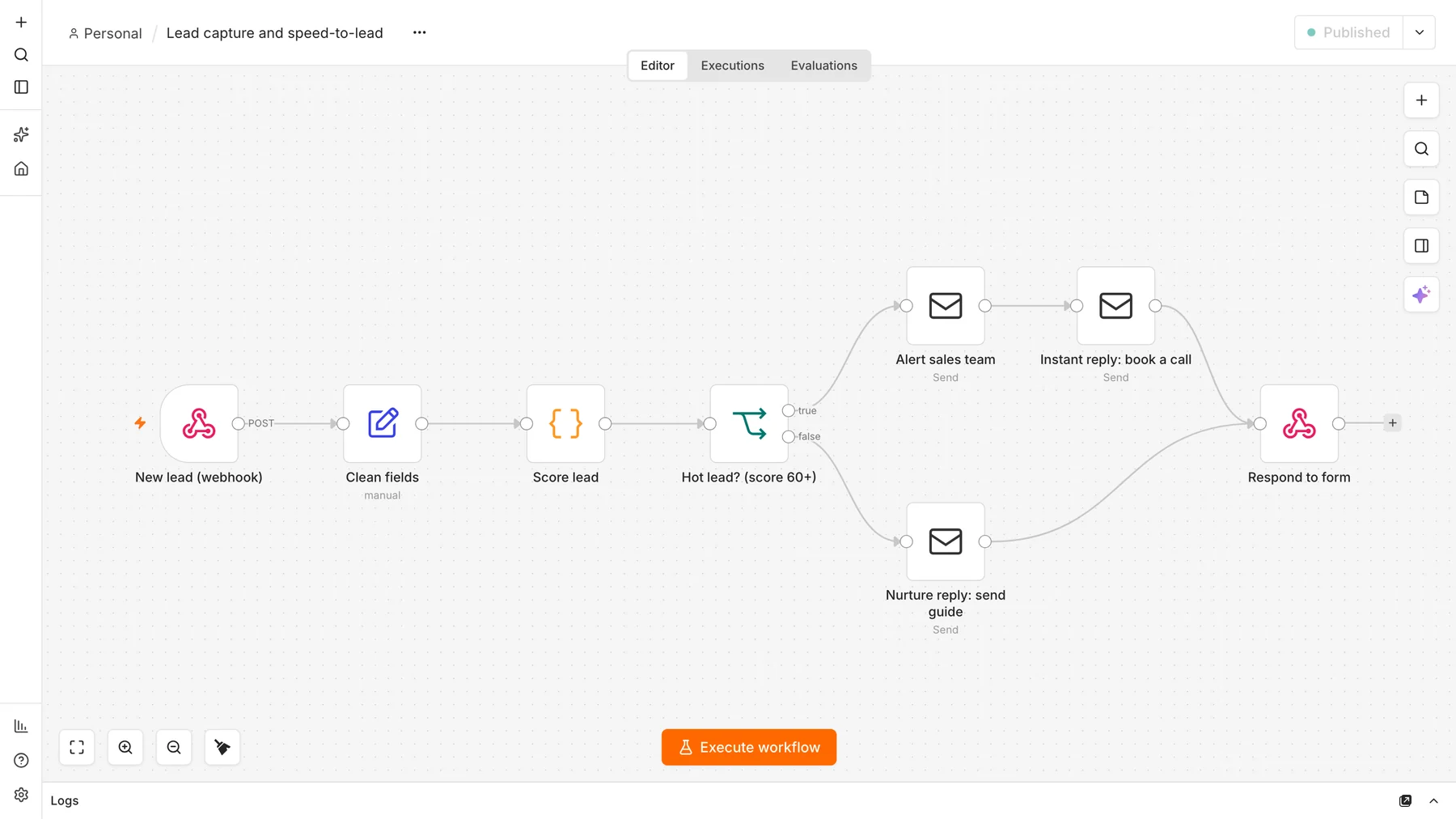
The flow has eight nodes: a webhook that receives the lead, a node that cleans the fields, a code node that scores the lead, an If node that separates hot leads from the rest, three email nodes, and a final node that answers the form.
What does it cost to run? The software is free: self-hosted n8n may be used at no charge for internal business and personal use under its Sustainable Use License. What you pay for is somewhere to run it. A schedule only fires while n8n is running, so you need a computer or server that stays on. Sending email needs an SMTP account (many providers have a free tier), and n8n Cloud is a paid alternative if you prefer not to host it yourself.
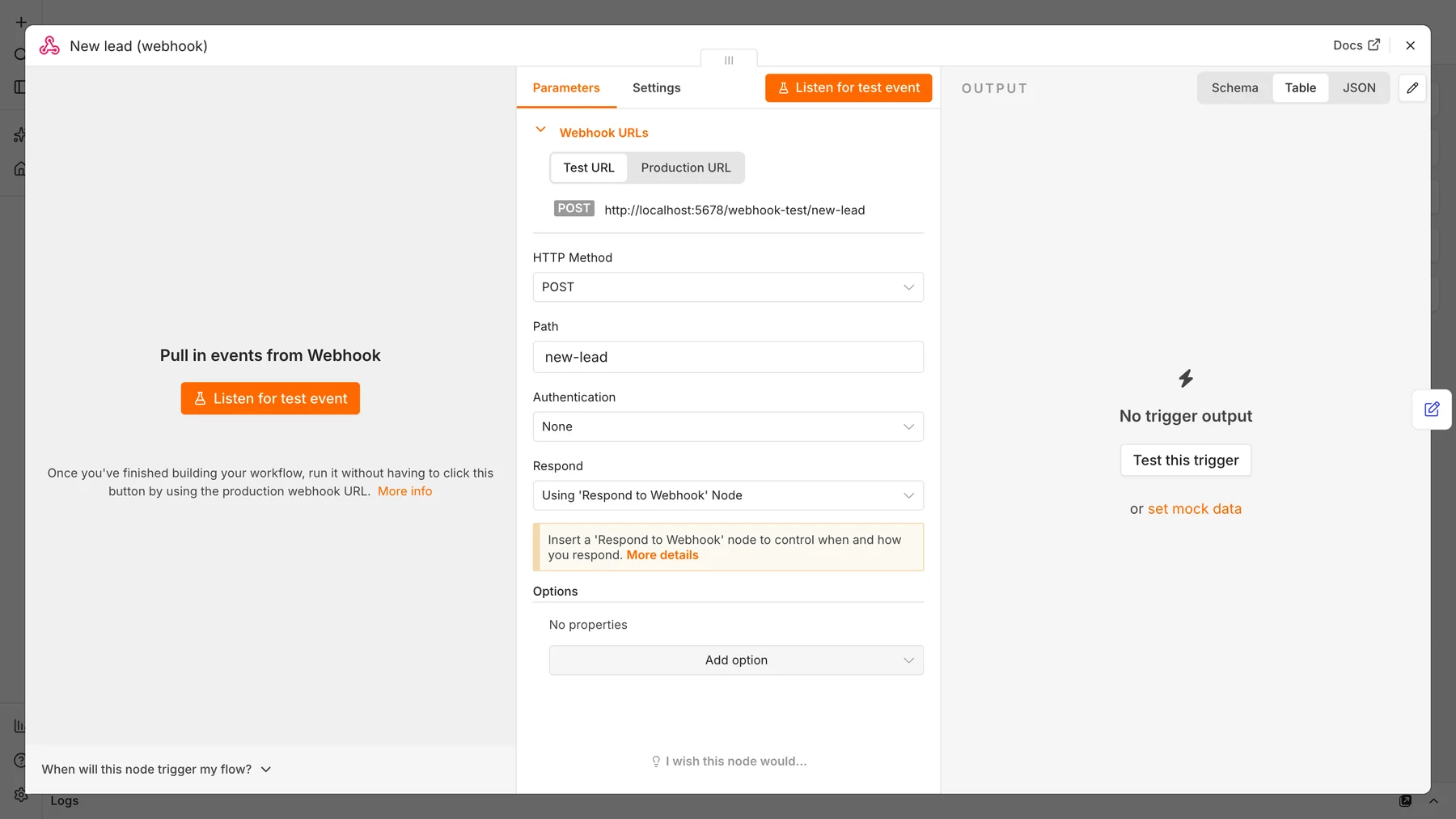
Step 1: Add a Webhook trigger
Create a new workflow and add a Webhook node. Set the HTTP method to POST, the path to new-lead, and “Respond” to Using ‘Respond to Webhook’ node, so the form gets an answer only after the workflow has finished. n8n shows a Test URL for building and a Production URL that works once the workflow is published.
Step 2: Clean the incoming fields
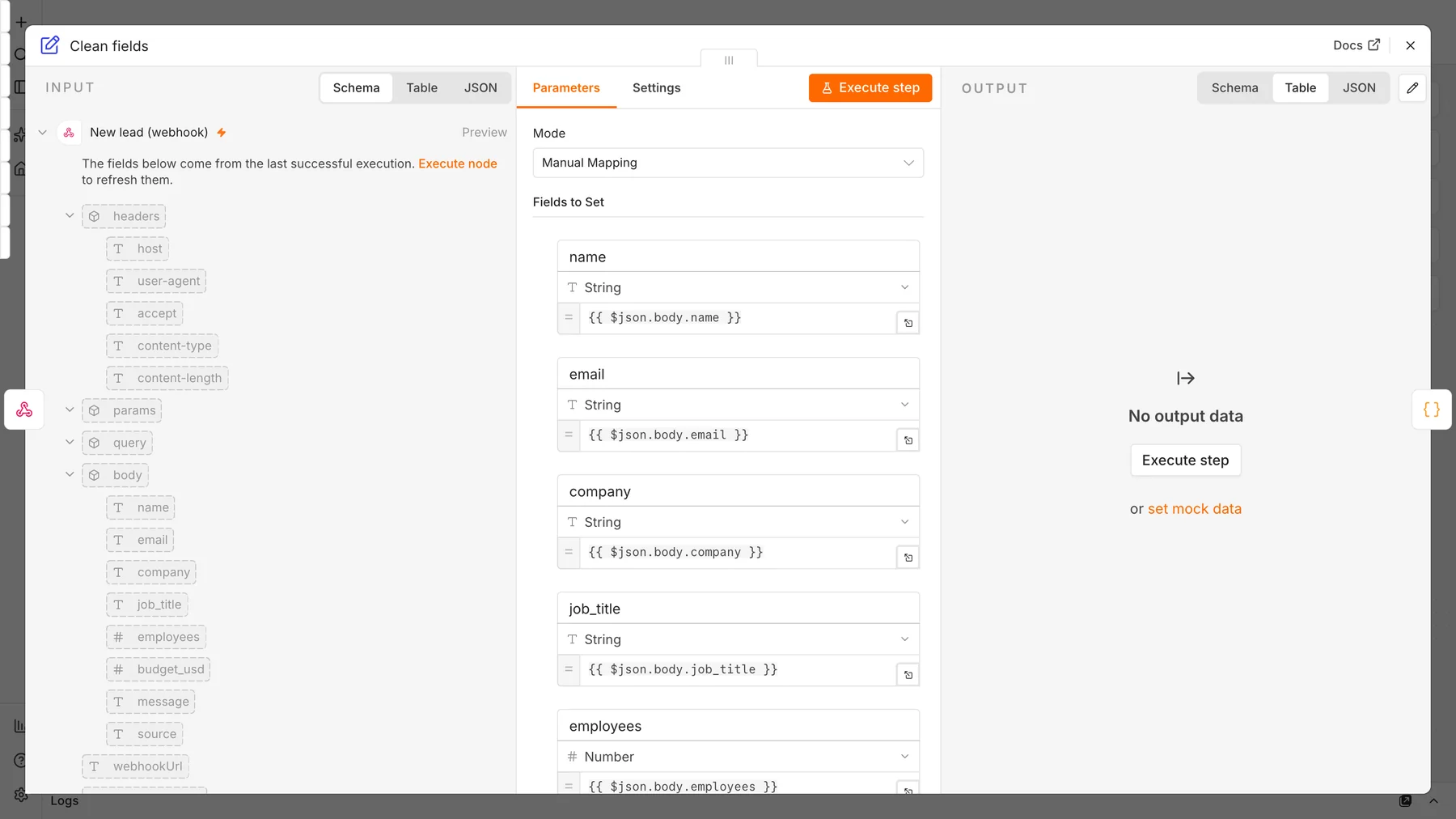
Form tools send data in different shapes. Add an Edit Fields (Set) node that maps the request body to plain field names: name, email, company, job_title, employees (number), budget_usd (number), message and source. Every later node can then rely on the same names.
Step 3: Score the lead
Add a Code node set to “Run Once for All Items” and JavaScript. It awards points for company size, budget, a decision-maker title and an urgent timeline, subtracts points for free email addresses, and outputs a score, a tier (hot, warm or cold) and a plain-English list of reasons.
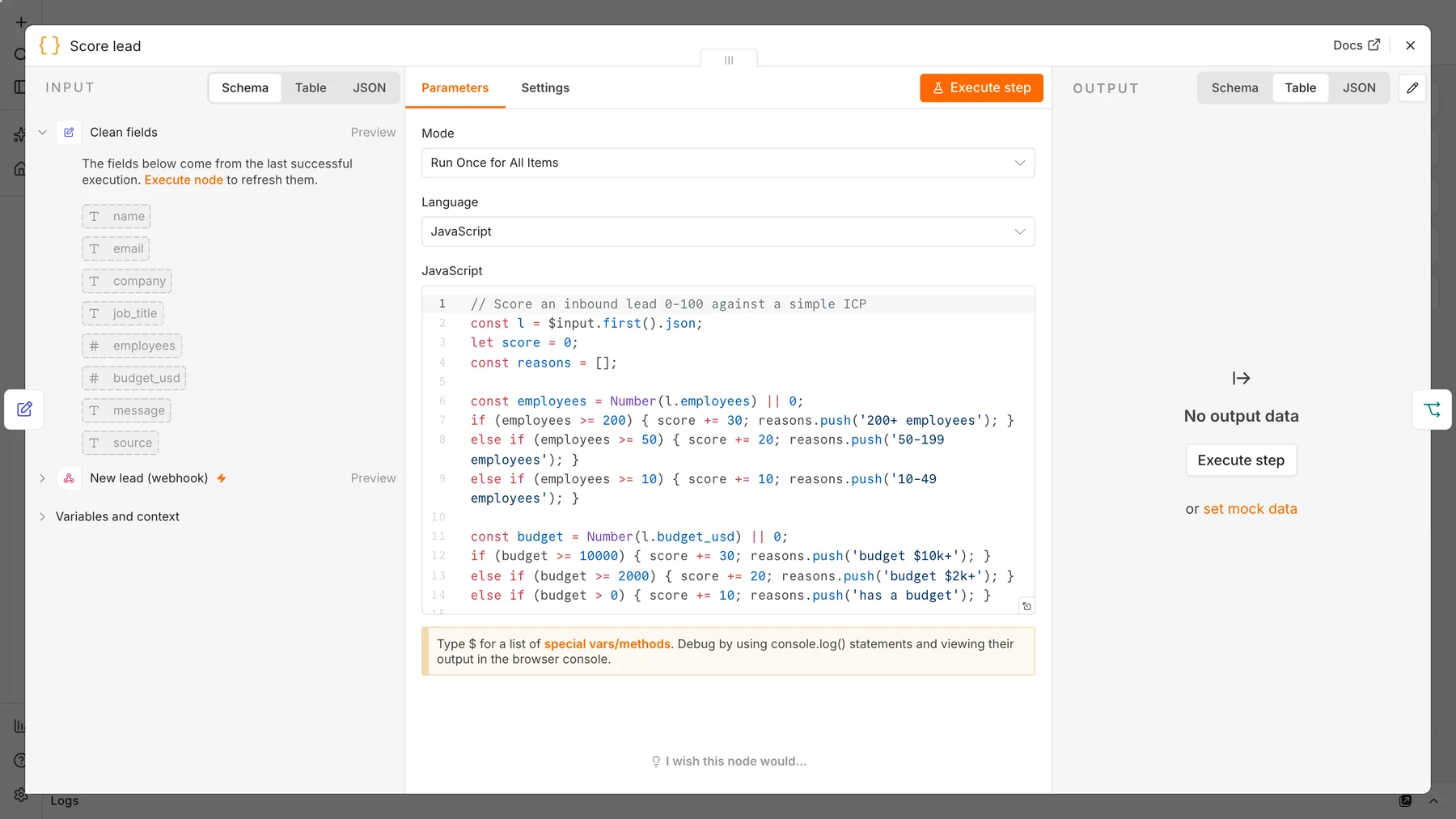
Here is the full code so you can copy it. Change the numbers to match your own ideal customer:
// Score an inbound lead 0-100 against a simple ICP
const l = $input.first().json;
let score = 0;
const reasons = [];

const employees = Number(l.employees) || 0;
if (employees >= 200) { score += 30; reasons.push('200+ employees'); }
else if (employees >= 50) { score += 20; reasons.push('50-199 employees'); }
else if (employees >= 10) { score += 10; reasons.push('10-49 employees'); }

const budget = Number(l.budget_usd) || 0;
if (budget >= 10000) { score += 30; reasons.push('budget $10k+'); }
else if (budget >= 2000) { score += 20; reasons.push('budget $2k+'); }
else if (budget > 0) { score += 10; reasons.push('has a budget'); }

if (/(founder|ceo|owner|director|head|vp|chief|cfo|coo|cmo)/i.test(l.job_title || '')) {
  score += 25; reasons.push('decision-maker title');
}
if (/(asap|this month|this week|urgent|now)/i.test(l.message || '')) {
  score += 15; reasons.push('urgent timeline');
}
if (/@(gmail|yahoo|hotmail|outlook|icloud)\./i.test(l.email || '')) {
  score -= 10; reasons.push('free email domain');
}

score = Math.max(0, Math.min(100, score));
const tier = score >= 60 ? 'hot' : score >= 30 ? 'warm' : 'cold';
return [{ json: { ...l, score, tier, reasons: reasons.join(', ') } }];
Step 4: Route hot leads with an If node
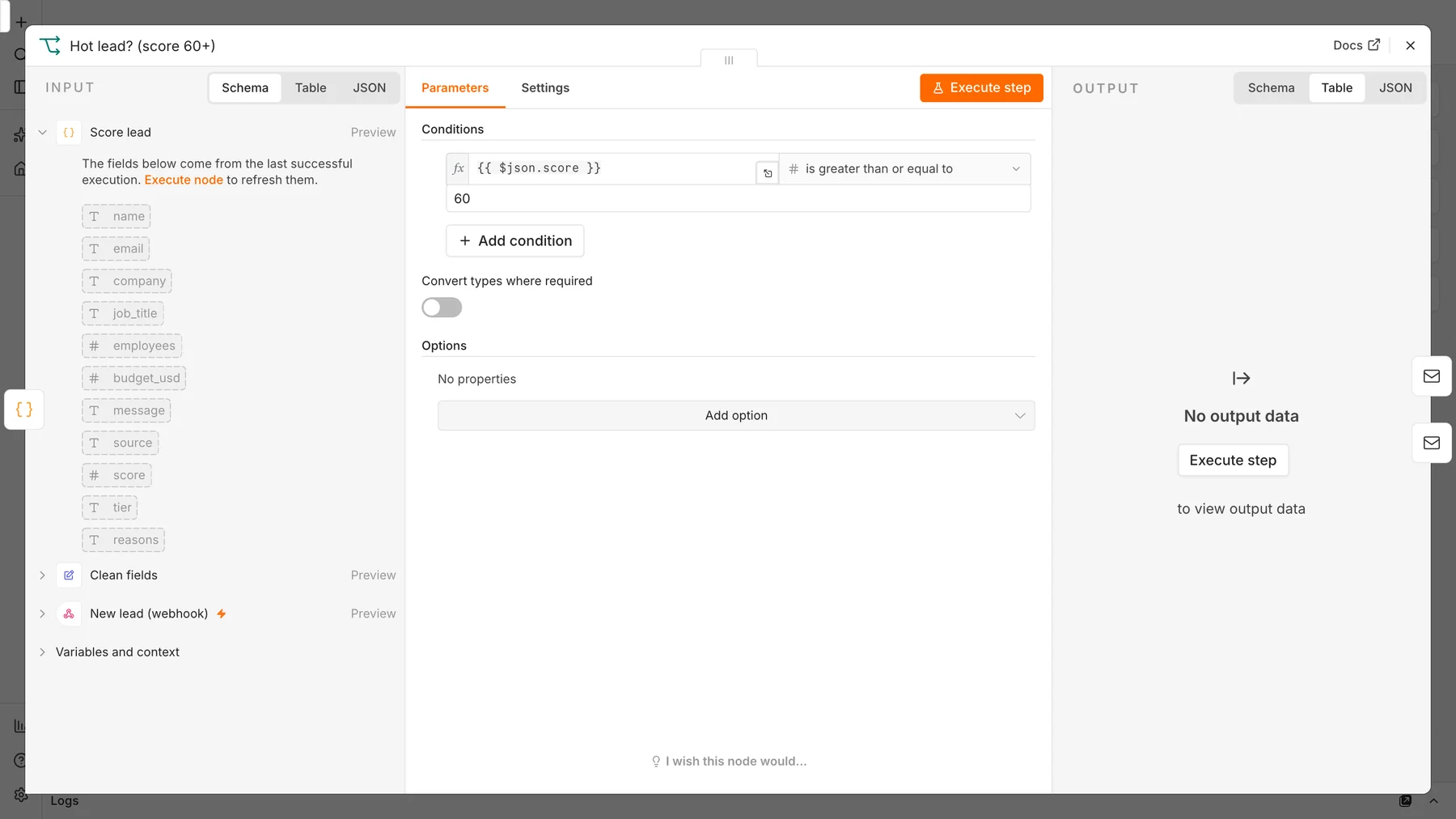
Add an If node with one condition: score is greater than or equal to 60. The true output is your hot path; the false output is everything else.
Step 5: Send the sales alert and the instant reply
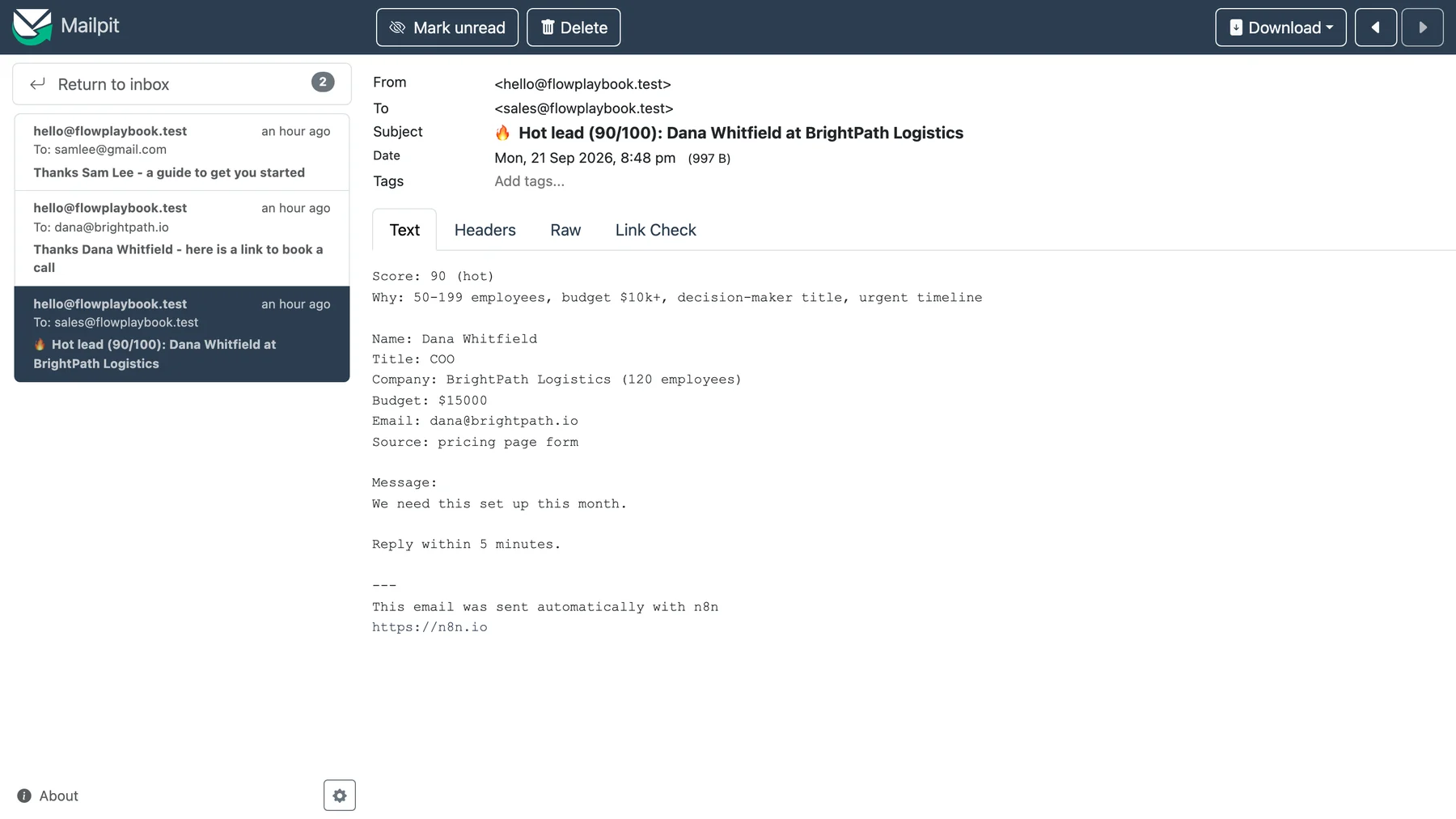
On the true path, add a Send Email node that alerts your sales team with the score, the reasons and the contact details, followed by a second Send Email node that replies to the lead with a booking link. On the false path, add one more Send Email node that sends the lead a helpful guide instead. Use your own SMTP credential; for testing we pointed the credential at Mailpit on localhost.
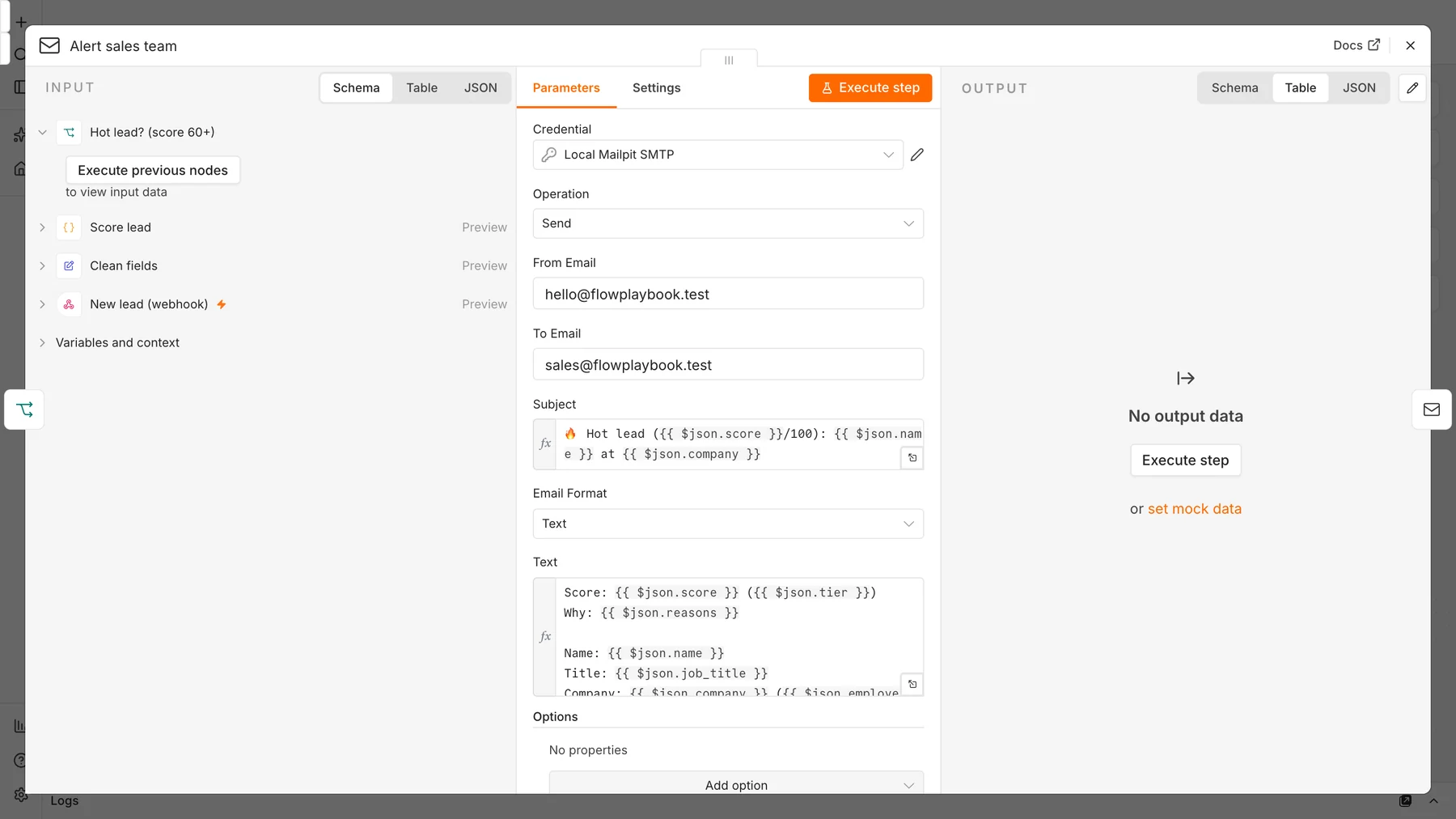
Common mistake: in the second email node, do not reference the lead with {{ $json.email }}. After a Send Email node runs, $json holds the email service’s response, not your lead data. Reference the earlier node explicitly instead: {{ $('Score lead').item.json.email }}. Section “Troubleshooting” below shows the error this causes.
Step 6: Answer the form
Finish both paths with a Respond to Webhook node that returns a short JSON message such as {"status":"received","tier":"hot","score":90}. Your form or website can use this to show a confirmation.
Step 7: Test both paths
Publish the workflow, then send a hot lead and a cold lead to the production URL. These are the two requests we used:
curl -X POST http://localhost:5678/webhook/new-lead \
  -H 'Content-Type: application/json' \
  -d '{"name":"Dana Whitfield","email":"dana@brightpath.io","company":"BrightPath Logistics","job_title":"COO","employees":120,"budget_usd":15000,"message":"We need this set up this month.","source":"pricing page form"}'
# -> {"status":"received","tier":"hot","score":90}

curl -X POST http://localhost:5678/webhook/new-lead \
  -H 'Content-Type: application/json' \
  -d '{"name":"Sam Lee","email":"samlee@gmail.com","job_title":"Student","employees":1,"budget_usd":0,"message":"Just browsing."}'
# -> {"status":"received","tier":"cold","score":0}
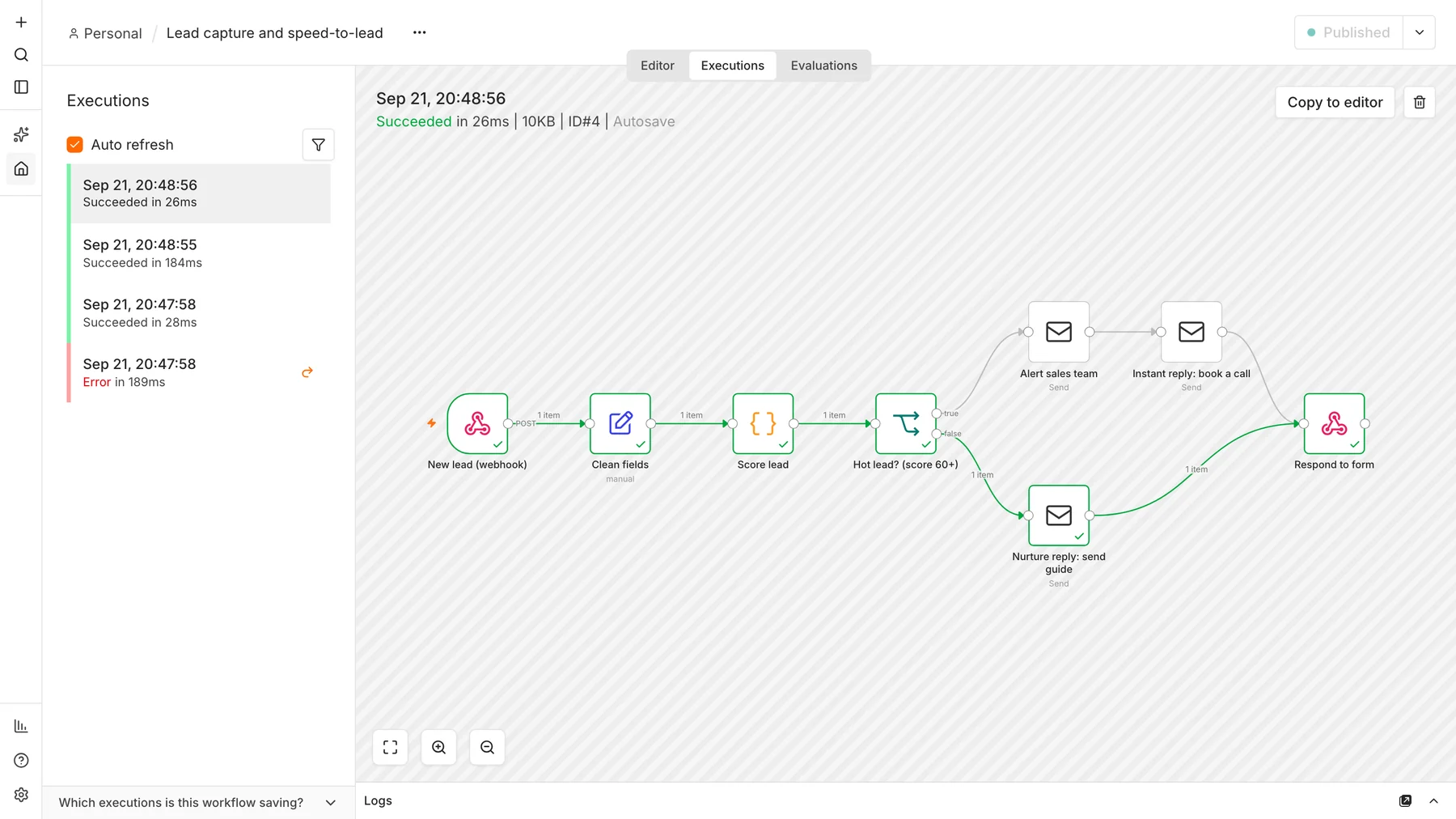
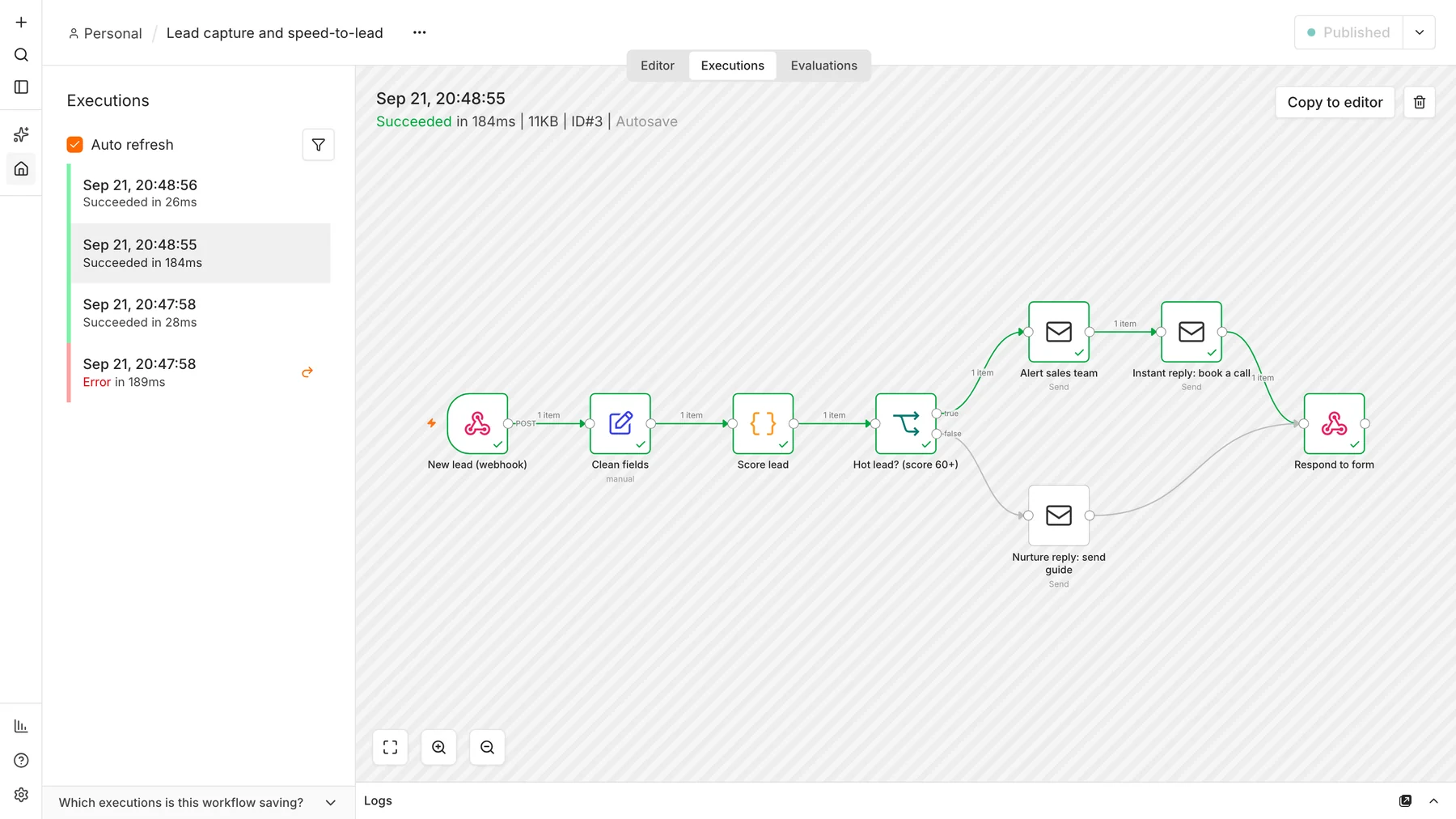
Dana scores 90 (50 to 199 employees, budget over $10,000, a decision-maker title and an urgent timeline), so sales is alerted and she receives the booking link. Sam scores 0 and receives the guide. Open the Executions tab to see each run and the exact path it took:

Troubleshooting

- “No recipients defined”: the email node’s To field is empty. This was our own first failure, caused by the
$jsonmistake above. Fix it by referencing the Score lead node. - 404 on the webhook URL: the Production URL only works when the workflow is published. While building, use the Test URL and click “Listen for test event” first.
- Browser form blocked (CORS): if a web page calls the webhook directly, add your site to the Webhook node’s allowed origins, or post from your server or form plugin instead.
- Spam submissions: add a hidden honeypot field or a CAPTCHA on the form, and ignore submissions where the honeypot is filled.
Connect a real form
Most form builders can send a submission to a URL when a form is submitted; look for a “webhook” option in your form plugin or tool and paste the Production URL. Map your form fields to the names in Step 2. Before going live, replace the test SMTP credential with your real one, remove the example booking and guide links, and store lead data only where you have permission to keep it.
Next step: this workflow replies once. To keep following up until a lead answers, build a full automated lead follow-up system with a timed four-touch email sequence that stops when the lead replies.
Follow the rules: email and calling compliance
Cold email is legal in the United States when it follows the CAN-SPAM Act, but the penalties for breaking it are steep: the Federal Trade Commission lists civil penalties of up to $53,088 for each violating email. The seven requirements in its compliance guide are:
- Use accurate header information (From, To, Reply-To and routing).
- Do not use deceptive subject lines.
- Identify the message as an advertisement.
- Include your valid physical postal address.
- Tell recipients clearly how to opt out of future emails.
- Honor opt-out requests promptly, within 10 business days.
- Monitor what others do on your behalf, since you remain responsible if an agency or tool sends for you.
Calling and texting prospects is covered by separate rules (in the U.S., the Telephone Consumer Protection Act), and emailing people in the EU or UK falls under GDPR and similar laws, which require a lawful basis and honor stricter consent rules. Check the rules for every country you target, and take legal advice before launching large campaigns. This guide is not legal advice.
Eight metrics that matter
Track numbers that connect to revenue, not just activity. Here are eight to start with and how to calculate them:
| Metric | How to calculate | Why it matters |
|---|---|---|
| Cost per lead (CPL) | Channel spend divided by leads from that channel | Shows which channels are cheap, but not which are good |
| Lead-to-opportunity rate | Opportunities divided by leads | Measures lead quality |
| Opportunity-to-customer rate | Customers divided by opportunities | Measures sales effectiveness |
| MQL-to-SQL rate | SQLs divided by MQLs | Shows whether marketing and sales agree on what “qualified” means |
| Median response time | Time from form submission to first human or automated reply, median across leads | The metric this workflow improves most |
| Lead source attribution | Leads and customers grouped by first source | Tells you where to spend the next hour or dollar |
| Customer acquisition cost (CAC) | Total sales and marketing spend divided by new customers | Compare against customer lifetime value |
| Pipeline coverage | Open pipeline value divided by your revenue target | Many teams aim for three to four times target; find the ratio that fits your win rate |
Your 30-day action plan
| Week | Focus | Deliverable |
|---|---|---|
| 1 | Define your ICP and choose two or three channels | One-page ICP; channel shortlist; list of 50 target accounts |
| 2 | Set up capture and the n8n workflow | Working form, webhook, scoring and instant reply; test leads verified |
| 3 | Launch outreach | Referral asks sent; first 100 cold emails or LinkedIn conversations started |
| 4 | Review and adjust | Leads by source, response time, first opportunities; decide what to keep, fix or drop |
Copy-and-paste templates
Referral request
Hi [Name], thank you again for the kind feedback on [project]. I'm looking to help a few more [type of company] with [problem]. Is there anyone in your network, for example a [job title] at a company like [example], who might find this useful? Happy to draft a two-line intro you can forward.Cold email (first touch)
Subject: Quick question about [specific problem]

Hi [Name],

I noticed [specific observation about their company]. Teams like yours often struggle with [problem], which leads to [cost of the problem].

We helped [similar company] [specific result]. Would it be useful if I sent over a short summary of how?

[Your name]
[Company, physical address]
[Simple opt-out line]
LinkedIn connection note
Hi [Name], I follow your posts on [topic] and liked your point about [specific detail]. I work with [type of company] on [problem]. Would be good to connect.Instant reply to a new enquiry
Hi [Name], thanks for getting in touch about [topic]. I can walk you through options this week. Pick a time that suits you here: [booking link]. If you'd rather email, just reply to this message.Frequently asked questions
What is the best way to generate sales leads?
There is no single best channel. Referrals and reconnecting with past customers are the fastest and cheapest to start, cold email scales quickly, and content and search compound over months. Most small teams do best with two or three channels run consistently for at least six weeks.
How can I generate sales leads for free?
Ask customers for referrals, contact past leads who said “not now”, answer questions in communities where your buyers gather, publish helpful content, and send personalized cold emails to a small, well-researched list. These cost time rather than money.
How fast should I respond to a new lead?
As fast as you can, ideally within minutes. A study in Harvard Business Review found that companies that contacted online leads within an hour were nearly seven times as likely to reach a decision-maker as companies that waited an hour longer. An automated first reply, like the n8n workflow above, closes the gap even when nobody is at their desk.
What is lead scoring?
Lead scoring assigns points to each lead based on how well they match your ideal customer and how ready they seem to buy. Signals can include company size, budget, job title, pages visited and the message they wrote. Leads above a threshold go to sales immediately.
Can I automate lead generation without coding?
You can automate capture, routing and replies without code using tools such as n8n, Make or Zapier. The workflow in this guide uses one small code node for scoring, but you can replace it with If nodes that check company size and budget.
Is cold emailing legal?
In the United States, cold email to business contacts is legal if it follows the CAN-SPAM Act: truthful headers and subject lines, a clear ad disclosure, your physical address and a working opt-out honored within 10 business days. The EU, the UK and other countries have stricter rules, so check the law where your recipients live.
Start with speed, then add channels
Lead generation works when you treat it as a system: know your customer, use a few channels well, capture every enquiry, respond fast and follow up with useful information. Import the workflow above, run the two test leads, and you will already respond faster than many companies. Then pick one new channel from the twelve and give it six weeks.
More in this series
- automated lead follow-up system: a four-touch n8n sequence that stops when a lead replies.
Sources and further reading
- The Short Life of Online Sales Leads, Harvard Business Review (Oldroyd, McElheran and Elkington), March 2011.
- CAN-SPAM Act: A Compliance Guide for Business, Federal Trade Commission.
- n8n Webhook node documentation.
- n8n Code node documentation.
- Mailpit, the email testing tool used for the screenshots.
- LinkedIn User Agreement.