Automate Competitor Price Tracking: Daily Alerts When Prices Move
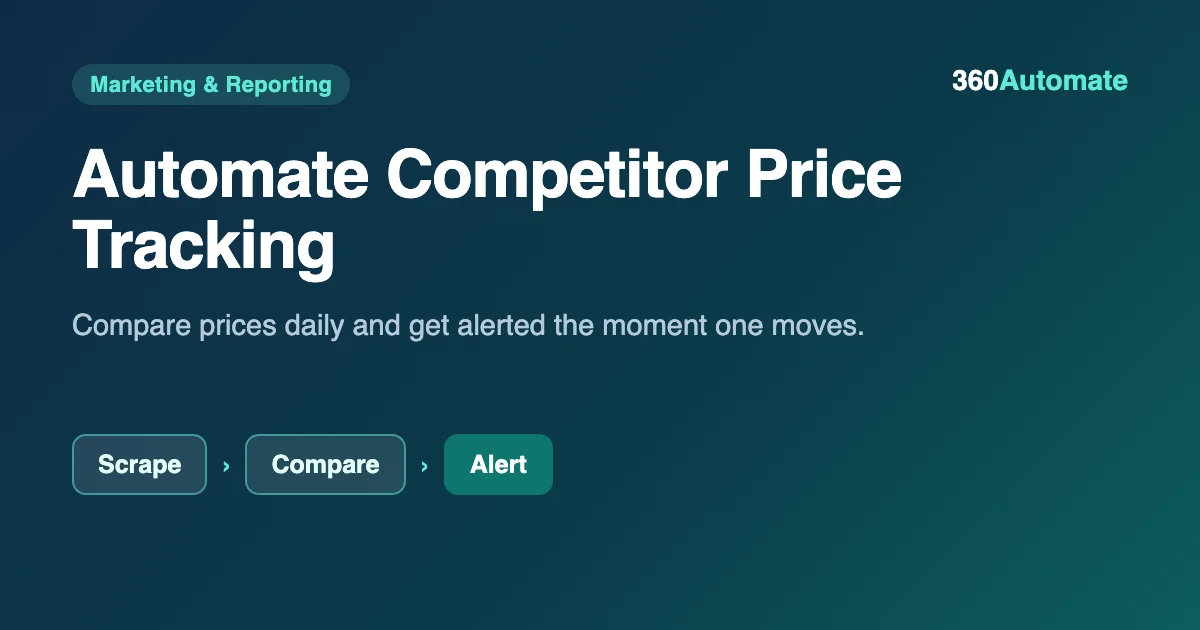
You can automate competitor price tracking in n8n by comparing today’s prices against yesterday’s and alerting only when something actually moved. We built it on a local n8n install and ran it on five sample SKUs across three competitors: two prices moved and triggered an alert, three stayed flat and were logged quietly instead.
- 2 of 5 sample SKUs changed price; both triggered a clear alert with the dollar and percent move.
- The other 3 stayed flat and were logged quietly instead of adding noise to the alert.
- Keeping today’s and yesterday’s price on one record avoids a real cross-branch timing bug we hit while building this.
- Add a real HTTP Request scraper and a Schedule Trigger to run it on actual competitor pages daily.
How to automate competitor price tracking
Price tracking is really just a daily diff: today’s price minus yesterday’s price, for every SKU you care about. The scraping part (actually fetching competitor pages) is the part most guides focus on, but the comparison logic is what turns raw numbers into something worth reading – and it is the part you fully control.
Here is how to automate competitor price tracking end to end, from sample data to a daily alert.
Build the price tracking workflow in n8n
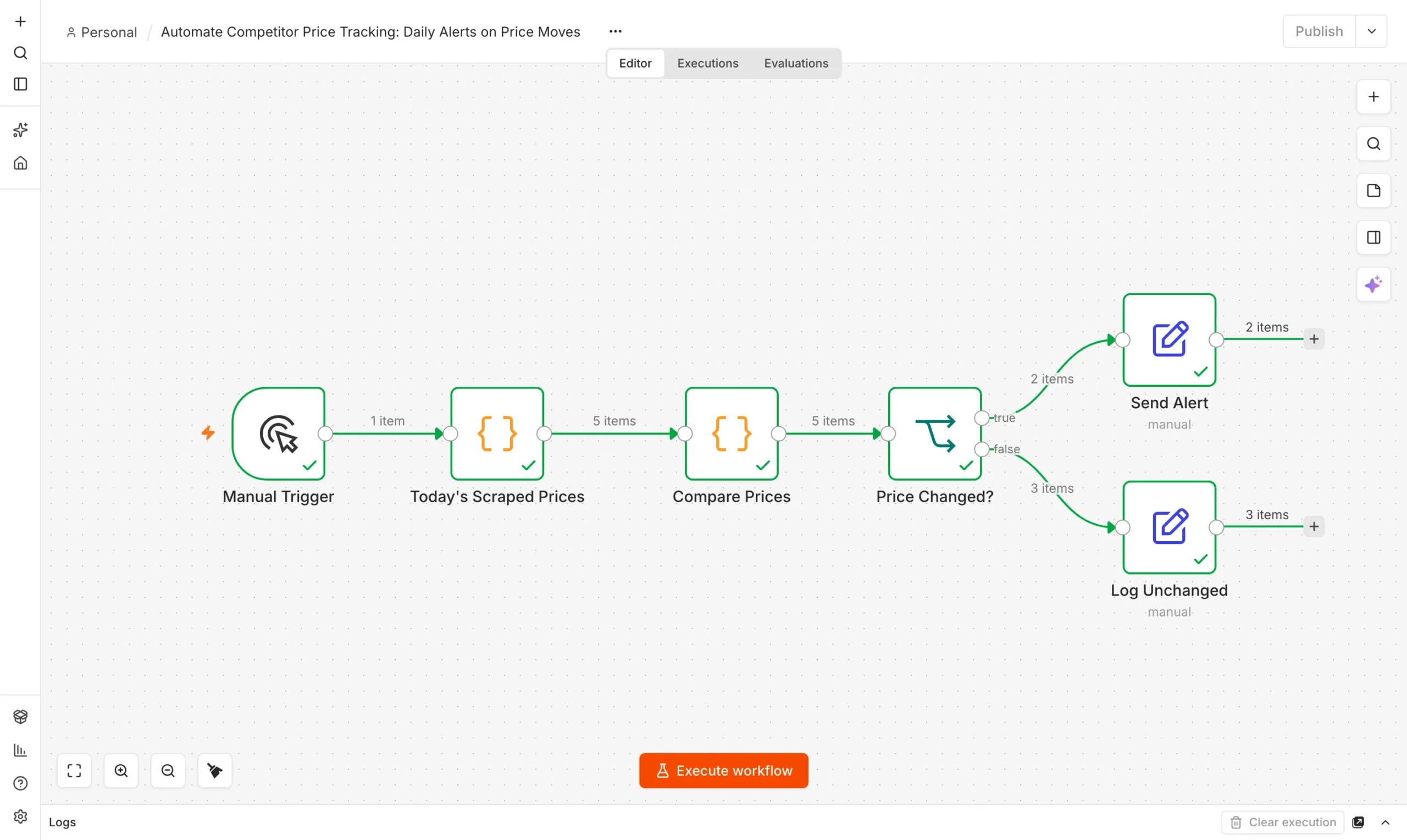
You need n8n running locally. Our free n8n setup guide covers the install. The build has three parts.
Today’s prices
A Code node returns five sample SKUs, each with today’s price and yesterday’s price attached.
Collect
Compare Prices
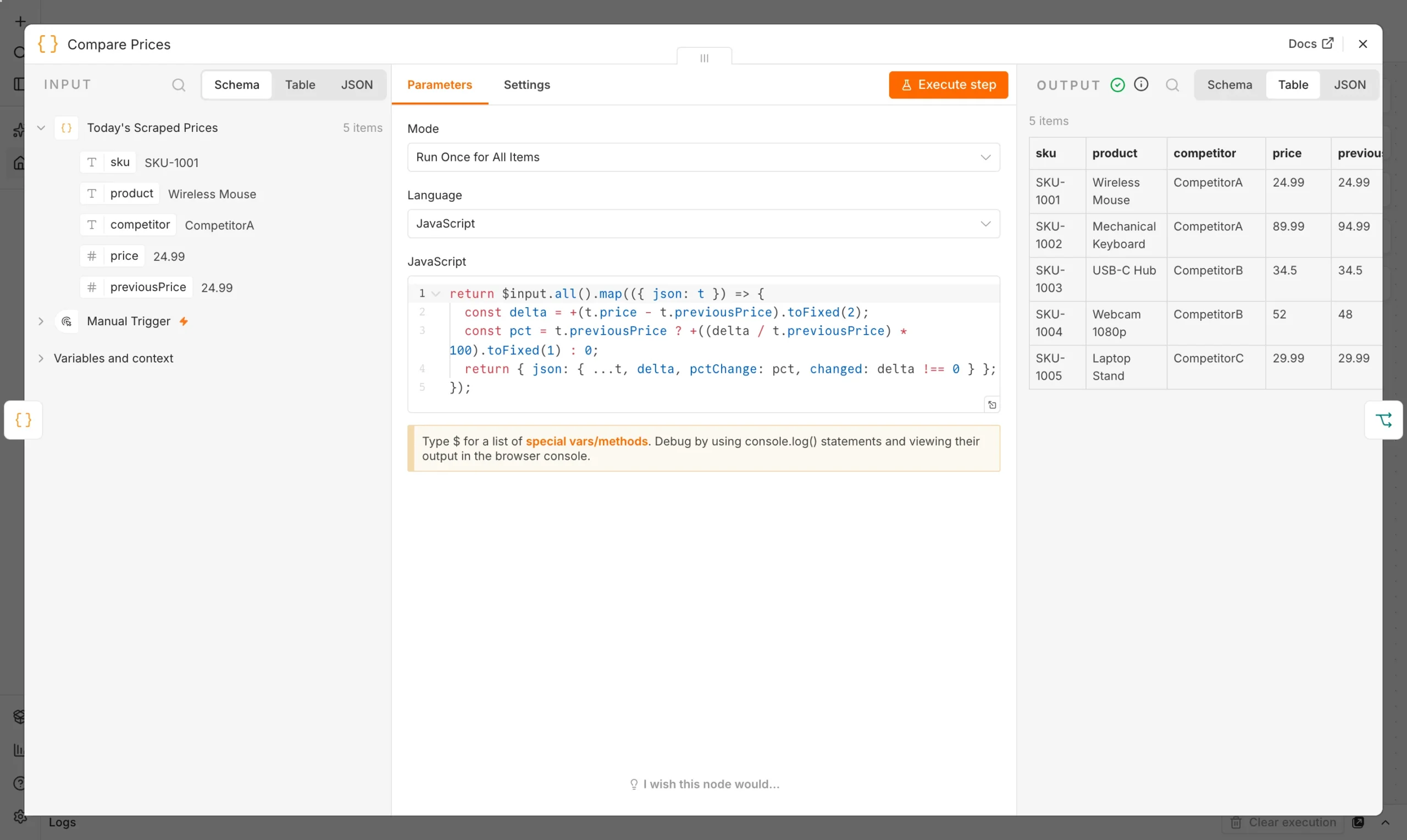
A Code node calculates the dollar and percent change for each SKU.
Compare
Price changed?
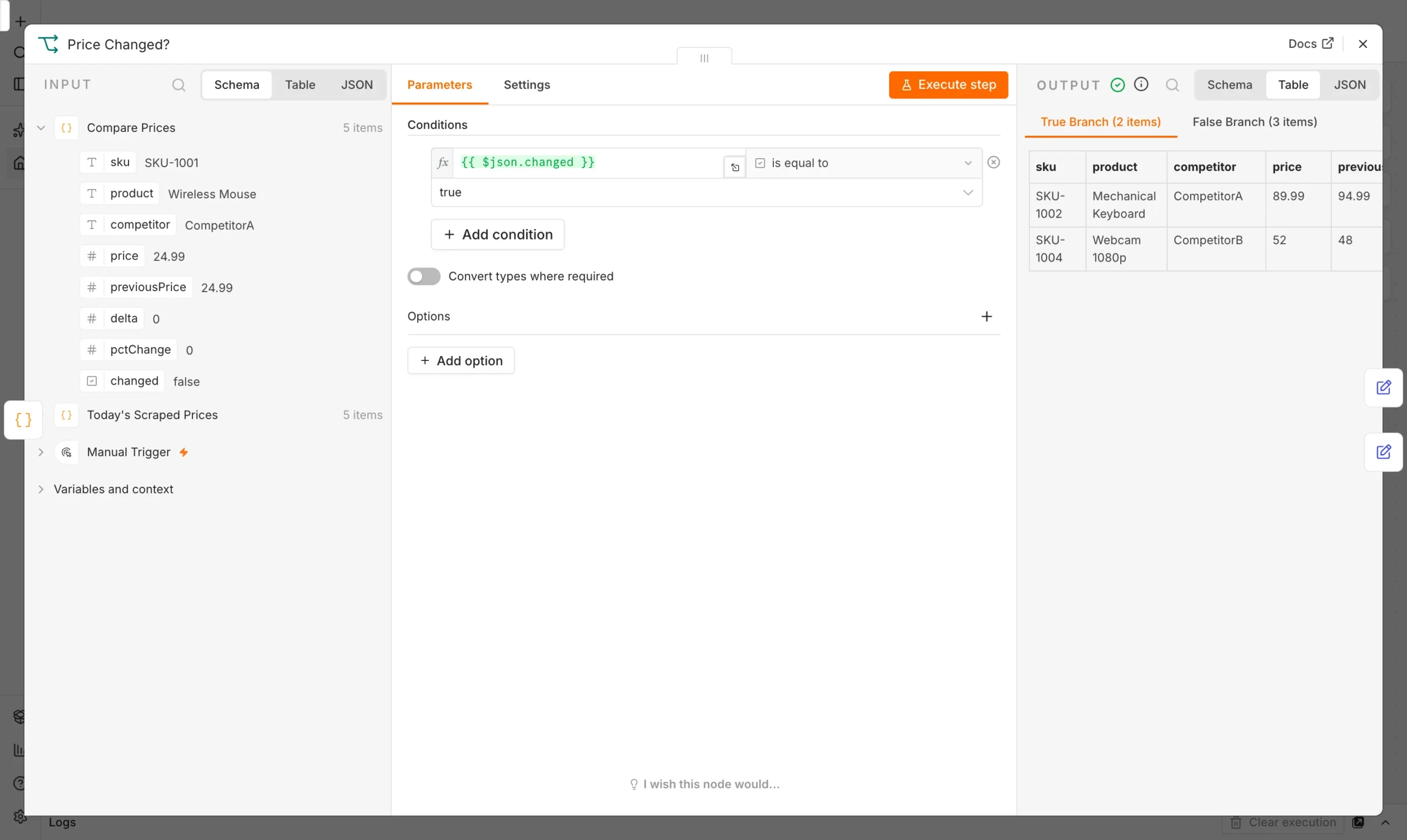
An If node splits moved prices from unchanged ones.
Route
The comparison itself is simple arithmetic, but getting the data into one place per item (rather than two separate datasets you have to join later) avoids a real bug we hit in an earlier version of this workflow: referencing a second branch’s data before it had finished running caused the whole node to fail. Keeping today’s and yesterday’s price on the same record sidesteps that entirely.
return $input.all().map(({ json: t }) => {
  const delta = +(t.price - t.previousPrice).toFixed(2);
  const pct = t.previousPrice ? +((delta / t.previousPrice) * 100).toFixed(1) : 0;
  return { ...t, delta, pctChange: pct, changed: delta !== 0 };
});
An If node checks whether the price actually changed and splits the five SKUs into an alert branch and a quiet log branch.
What happened when we ran it
We ran the workflow on five sample SKUs across three competitors on our local n8n install. Every node finished with a green check.
| Product | Competitor | Yesterday | Today | Change |
|---|---|---|---|---|
| Wireless Mouse | CompetitorA | $24.99 | $24.99 | No change |
| Mechanical Keyboard | CompetitorA | $94.99 | $89.99 | -5.3% |
| USB-C Hub | CompetitorB | $34.50 | $34.50 | No change |
| Webcam 1080p | CompetitorB | $48.00 | $52.00 | +8.3% |
| Laptop Stand | CompetitorC | $29.99 | $29.99 | No change |
Two of five prices moved: one competitor dropped a price by over 5%, another raised one by over 8%. The other three stayed flat and were logged quietly instead of generating noise. That is the actual point of the Price Changed check – without it, you get a daily email listing five unchanged prices for every one that is worth acting on, and people stop reading it within a week.
Connect it to real competitor pages
- Add real scraping. Replace the sample data with an HTTP Request node and an HTML Extract node pointed at competitor product pages.
- Store yesterday’s prices properly. A Google Sheet or small database table, updated at the end of each run, replaces the hardcoded sample.
- Run it daily. A Schedule Trigger set for early morning keeps the comparison meaningful before your own pricing decisions for the day.
- Respect robots.txt and rate limits. Space out requests and check each site’s scraping policy before pointing this at real pages.
Once you are tracking real prices, pair this with our automated SEO reports workflow to see competitive moves alongside your own search performance.
Why alert only on real changes
The instinct when building a monitoring workflow is to report everything, on the theory that more information is safer. In practice, a daily message listing five prices where three did not change trains people to stop reading it within a week – the signal gets buried in noise they have already learned to ignore. Splitting the output into an active alert branch and a quiet log branch keeps the alert channel reserved for things that actually need a decision, while the log still preserves a complete daily record for anyone who wants to look back at pricing history later.
Build versus a paid price-tracking service
Dedicated price-tracking tools exist and handle the scraping infrastructure, proxy rotation and anti-bot handling that a DIY scraper eventually runs into at scale. For a handful of competitors and products, the overhead of a paid service is often not worth it: an n8n workflow you control costs nothing beyond your own hosting, and you decide exactly what counts as a meaningful change rather than working within a vendor’s alerting rules. If you are tracking hundreds of SKUs across sites that actively resist scraping, a paid service’s infrastructure starts to earn its cost.
What this actually saves
Manually checking five competitor product pages every morning, logging the prices, and comparing them to yesterday’s numbers is realistically a 10-15 minute task done well, and a task that is one of the first things to get skipped when someone is busy – which is exactly when a real price change is most likely to go unnoticed. Automating the check means it happens every single day without fail, and the only time anyone spends on it is reading the two-line alert on the days something actually moved.
Checklist before you point this at real competitor pages
- Check each target site’s robots.txt and terms of service before scraping, and skip any site that explicitly disallows it.
- Start with a small, fixed list of SKUs and competitors rather than trying to track an entire catalog on day one – verify accuracy on a handful before scaling up.
- Build in a reasonable delay between requests (a few seconds, not milliseconds) to avoid looking like an attack and to reduce the chance of being blocked.
- Decide your alert threshold in dollars or percent before turning on real alerts, so you are not retroactively tuning out noise after the first flood of notifications.
Common mistakes when automating price tracking
- Scraping too aggressively. Hitting a competitor’s site every few minutes looks like an attack and risks getting blocked – once-daily or a few-times-daily checks are enough for most pricing decisions.
- Treating a 1-cent rounding difference the same as a real price cut. Set a minimum percentage or dollar threshold before something counts as a real “change” worth an alert, to avoid noise from inconsequential rounding.
- Joining today’s and yesterday’s data across separate branches. As we hit directly while building this, referencing a parallel branch’s output before it has run causes a hard failure – keep the comparison values on the same record from the start.
- Not handling a page that fails to load. A real scraper will occasionally hit a changed page layout or a timeout; make sure a failed fetch is logged as “unknown” rather than silently treated as “no change.”
A few more details on how to automate competitor price tracking reliably.
Frequently asked questions
Do I need a paid tool to track competitor prices?
Not to start. This workflow runs on free, built-in n8n nodes. Adding real scraping of competitor pages needs an HTTP Request node, still free, though some sites actively block scraping.
How often should I check competitor prices?
Daily is a common cadence for retail; faster-moving categories may need a few times a day. Match the schedule to how often your own prices actually change.
What should trigger an alert versus a quiet log?
Any real price change deserves at least a log entry; reserve an active alert (Slack, email) for changes past a threshold you set, so small rounding differences do not create noise.
Is scraping competitor prices legal?
Scraping publicly available pricing is common practice, but always check the target site’s terms of service and robots.txt, and avoid request volumes that could be mistaken for an attack.
Can I track prices across more than three competitors?
Yes – the workflow scales by adding more sample SKUs or, once connected to real scraping, more target URLs per competitor.
How do I store yesterday’s price for comparison?
Write today’s scraped price to a sheet or small database at the end of each run, then read it back as “yesterday’s price” the next time the workflow runs.
What if a competitor’s page structure changes and scraping breaks?
Log the failure explicitly rather than treating a failed scrape as “no change” – a silent failure is worse than no data at all, since it creates false confidence that prices are stable.