Automate Employee Onboarding: Build a New-Hire Workflow in n8n
To automate employee onboarding, turn the start date into a dated checklist, send each person only their own tasks, and schedule the check-ins that people forget. Automation handles the reminders and requests, so HR and managers can spend their time on the welcome itself. This guide builds a free n8n workflow: one new-hire request creates a checklist, emails the new hire, IT and the manager, and schedules day-one, week-one and 30-day messages. We tested it end to end.
Key takeaways
- Automate requests, reminders and check-ins. Keep the welcome, the first conversations and anything sensitive human.
- Base every date on the start date, so one field produces the whole plan.
- Send each person only the tasks that are theirs: new hire, IT, manager, HR.
- Legal steps have deadlines. In the U.S., for example, Section 1 of Form I-9 is due by the employee’s first day of work. Check the rules for your country with HR or legal advice.
What to automate and what to keep human
| Onboarding task | Automate? | Why |
|---|---|---|
| Creating the checklist with due dates | Yes | Same steps every time, and dates follow the start date |
| Equipment and account requests to IT | Yes | Removes forgotten laptops and missing logins |
| Welcome email with practical details | Yes | Consistent, timely and easy to personalize with a name and role |
| Reminders to managers and HR | Yes | The tasks most often forgotten |
| Week-one and 30-day check-in prompts | Yes, then a person acts | The prompt is automatic; the conversation is not |
| The first-day welcome and team introductions | No | This is the human part that builds belonging |
| Sensitive issues, accommodations, performance concerns | No | Need judgment and confidentiality |
The timeline we automate
Before day one
IT orders equipment, HR sends forms, the manager plans week one
Day one
Welcome email with the practical details
End of week one
Manager check-in prompt
Day 30
Feedback survey to the new hire
Build the workflow in n8n
You need n8n and an SMTP account (we used Mailpit as a test inbox). Download the workflow (JSON) and import it, then choose your own email credential on each email node.
What does it cost to run? The software is free: self-hosted n8n may be used at no charge for internal business and personal use under its Sustainable Use License. You pay for somewhere to keep it running, because timed emails only send while n8n is up, and for an SMTP account to send email (many providers have a free tier). n8n Cloud is a paid alternative.
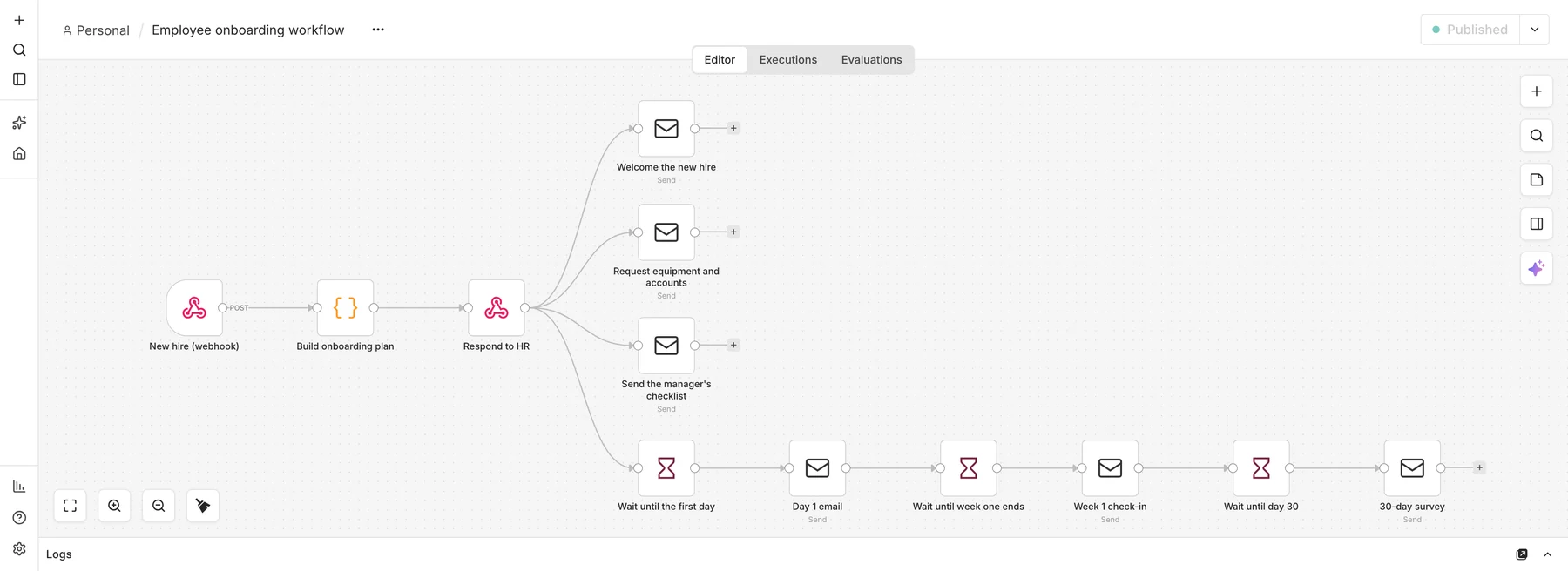
Step 1: Receive the new hire
Add a Webhook node (POST, path new-hire). Your HR form or HR system calls it with the name, email, role, department, start date and manager’s email. Keep the data minimal: never send national ID numbers, bank details or health information through a workflow.
Step 2: Build the plan
A Code node validates the fields, picks equipment by department and creates seven tasks, each with an owner and a due date counted from the start date:
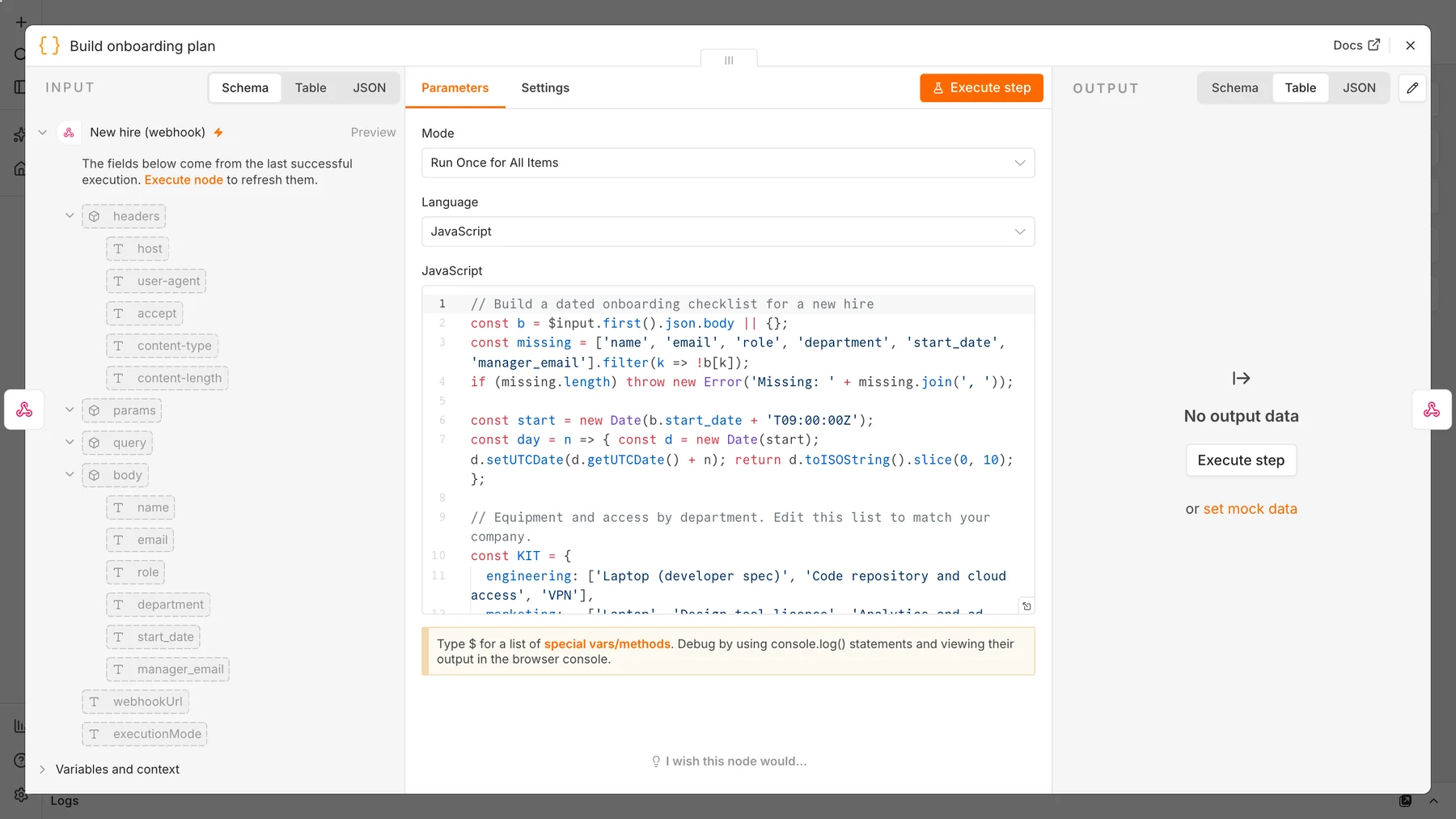
const day = n => { const d = new Date(start); d.setUTCDate(d.getUTCDate() + n); return d.toISOString().slice(0, 10); };

const tasks = [
  { owner: 'IT',      due: day(-5), task: 'Order equipment and create accounts: ' + items.join(', ') },
  { owner: 'HR',      due: day(-3), task: 'Send the contract and required forms' },
  { owner: 'Manager', due: day(-2), task: 'Prepare the first-week schedule and 30-60-90 day goals' },
  { owner: 'HR',      due: day(0),  task: 'Welcome the new hire and give the benefits overview' },
  { owner: 'Manager', due: day(5),  task: 'Hold the week-one check-in' },
  { owner: 'HR',      due: day(30), task: 'Send the 30-day feedback survey' },
];
Step 3: Confirm, then send three kickoff emails
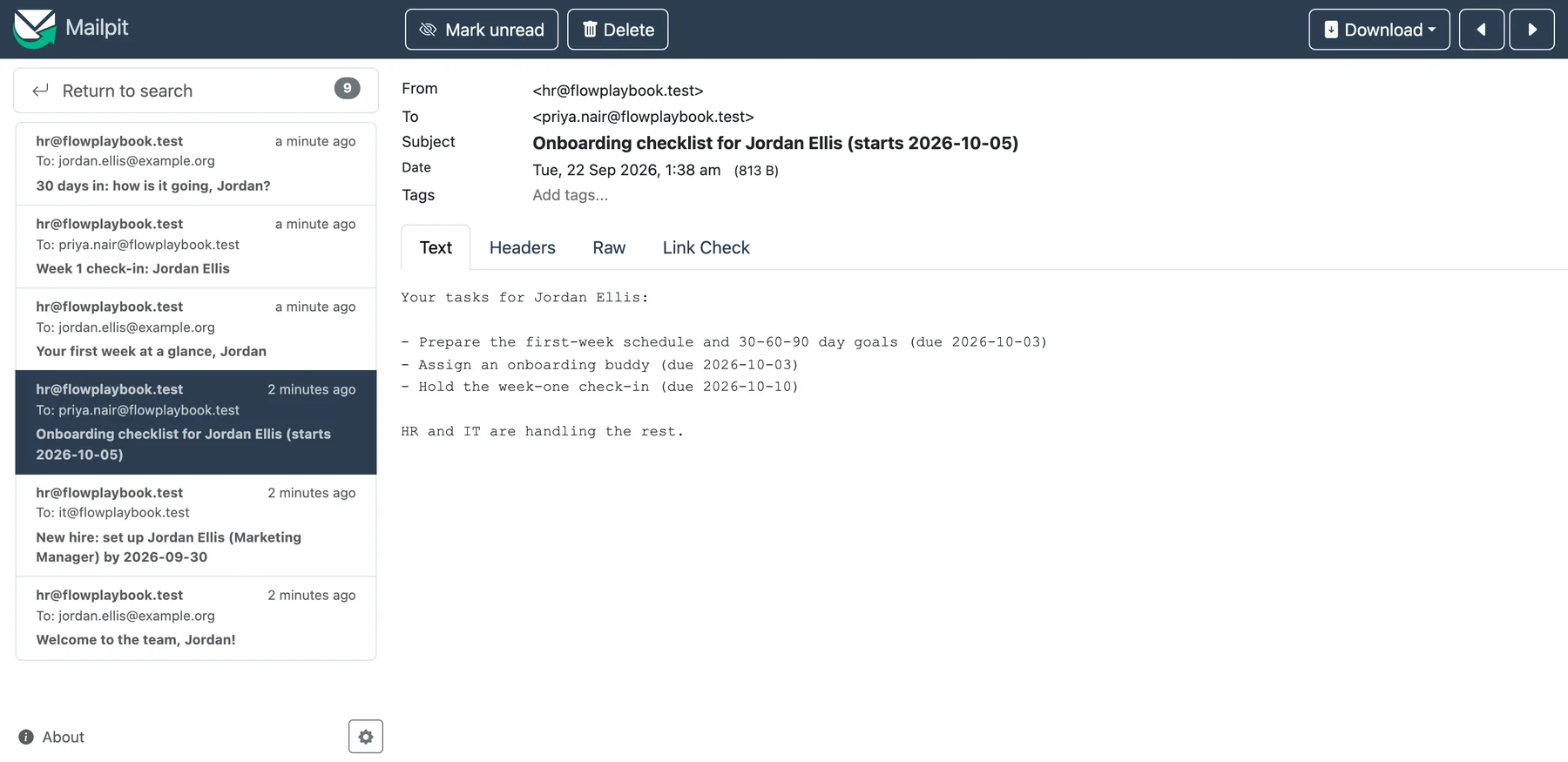
A Respond to Webhook node confirms to HR that the plan exists ({"status":"onboarding plan created","tasks":7}). Three Send Email nodes then run in parallel: a welcome to the new hire, an equipment request to IT listing the items and the deadline, and a checklist to the manager containing only the manager’s tasks.
Step 4: Schedule the check-ins with Wait nodes
From the same point, add a chain of Wait and Send Email nodes: wait until the first day, then send the day-one email; wait until the end of week one, then prompt the manager; wait until day 30, then send the feedback survey. For our test we waited 12 seconds between steps. In production, set the waits to real time, for example 5 days, 5 days and 25 days, or calculate the wait from the start date. Longer waits are stored and resumed later, so n8n must be running when each time arrives.
Remember the earlier trap. After an email node, $json holds the email service’s response, not your hire. The timed emails read the hire with $('Build onboarding plan').item.json instead. It is the same fix as in our lead-scoring guide.
Step 5: Test it
curl -X POST http://localhost:5678/webhook/new-hire -H 'Content-Type: application/json' \
  -d '{"name":"Jordan Ellis","email":"jordan.ellis@example.org","role":"Marketing Manager",
       "department":"Marketing","start_date":"2026-10-05","manager_email":"priya.nair@example.com"}'
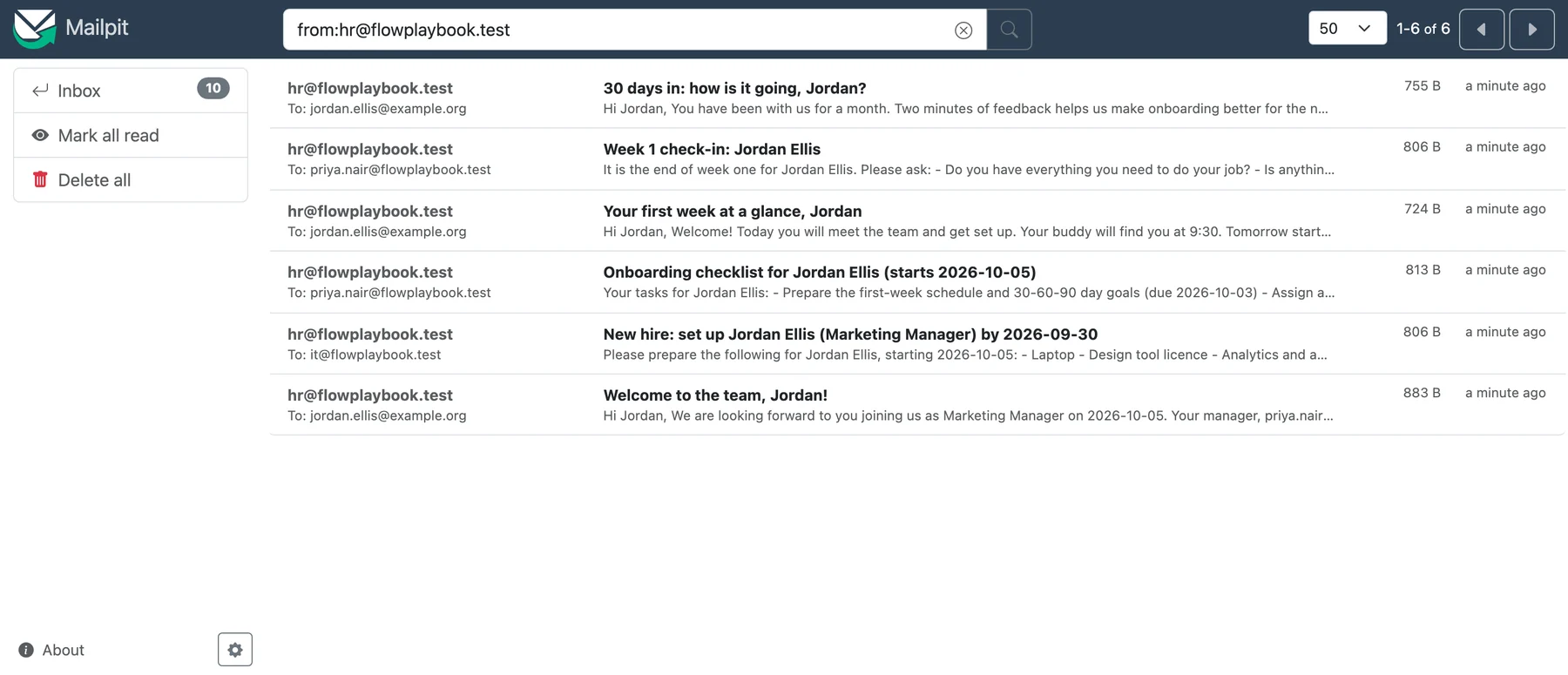
Within seconds the new hire, IT and the manager each received their email, with IT’s deadline calculated as 2026-09-30, five days before the start. Then, at 12-second intervals, the day-one email, the manager’s week-one check-in and the 30-day survey arrived.
Privacy and compliance
- Collect the minimum. Onboarding data is personal. Send names, roles and dates through the workflow, and handle IDs, bank details and health information in your secure HR system.
- Know your deadlines. In the U.S., the employee must complete Section 1 of Form I-9 “at the time of hire (by the first day the employee starts work for pay or other remuneration)”, and the employer completes Section 2 within three business days of the hire, according to the USCIS Handbook for Employers. Other countries and states have their own rules.
- Control access. Only HR should be able to trigger the webhook, so protect it with a secret header.
- This is not legal advice. Have HR or a lawyer review your onboarding steps.
Make it production-ready
- Trigger it from your HR system when a hire is marked as accepted, instead of a manual form.
- Track completion. Store each task’s status in a database or spreadsheet, so overdue items alert HR.
- Add chat and ticketing. Post the checklist to Slack or Teams and open a ticket for IT.
- Add e-signature and forms for contracts and policies.
- Build the mirror image. Offboarding needs the same kind of dated checklist, especially for revoking access.
Frequently asked questions
What is employee onboarding automation?
It is the use of workflows to handle the repeatable parts of onboarding: creating checklists, requesting equipment and accounts, sending welcome messages and scheduling check-ins.
What should not be automated in onboarding?
The personal parts: the welcome, team introductions, mentoring conversations and any sensitive or confidential matter. Automate the reminders that make those conversations happen.
Can n8n send timed emails days later?
Yes. The Wait node pauses a workflow for a set time, then continues. For long waits, n8n stores the paused run and resumes it, so the server must be running at that time.
How do I keep new-hire data secure in a workflow?
Send only what each step needs, avoid sensitive identifiers, restrict who can trigger the workflow, and keep records in a secure HR system rather than in emails.
Sources and further reading
- Completing Section 1 of Form I-9, USCIS Handbook for Employers (M-274).
- n8n Wait node.
- n8n Webhook node.
- n8n Code node.
- Mailpit, the test inbox used for the screenshots.