AI Agent for Data Analysis: Build One in n8n With a Free Local Model

An AI agent for data analysis is a language model that decides which tool to call, reads the numbers the tool returns, and answers your question in plain English. We built one in n8n using a free 2 GB model (Llama 3.2 3B) running on a laptop, then asked it nine questions and checked every answer against the real numbers. The first version got several wrong. Here is what failed and how we fixed it.
Key takeaways
- A small local model can answer data questions, but only when it reads ready-made figures from tools.
- Our first version answered 4 of 9 questions cleanly. After moving sorting and maths into the tools it answered 8 of 9 correctly.
- Small models make arithmetic mistakes, so never let them add up numbers themselves.
- Guardrails matter: our final agent still said “$0” for a month with no data instead of “no data”.
- Cost: $0 in software and API fees. Answers took 1 to 5 seconds on our laptop.
How the agent works
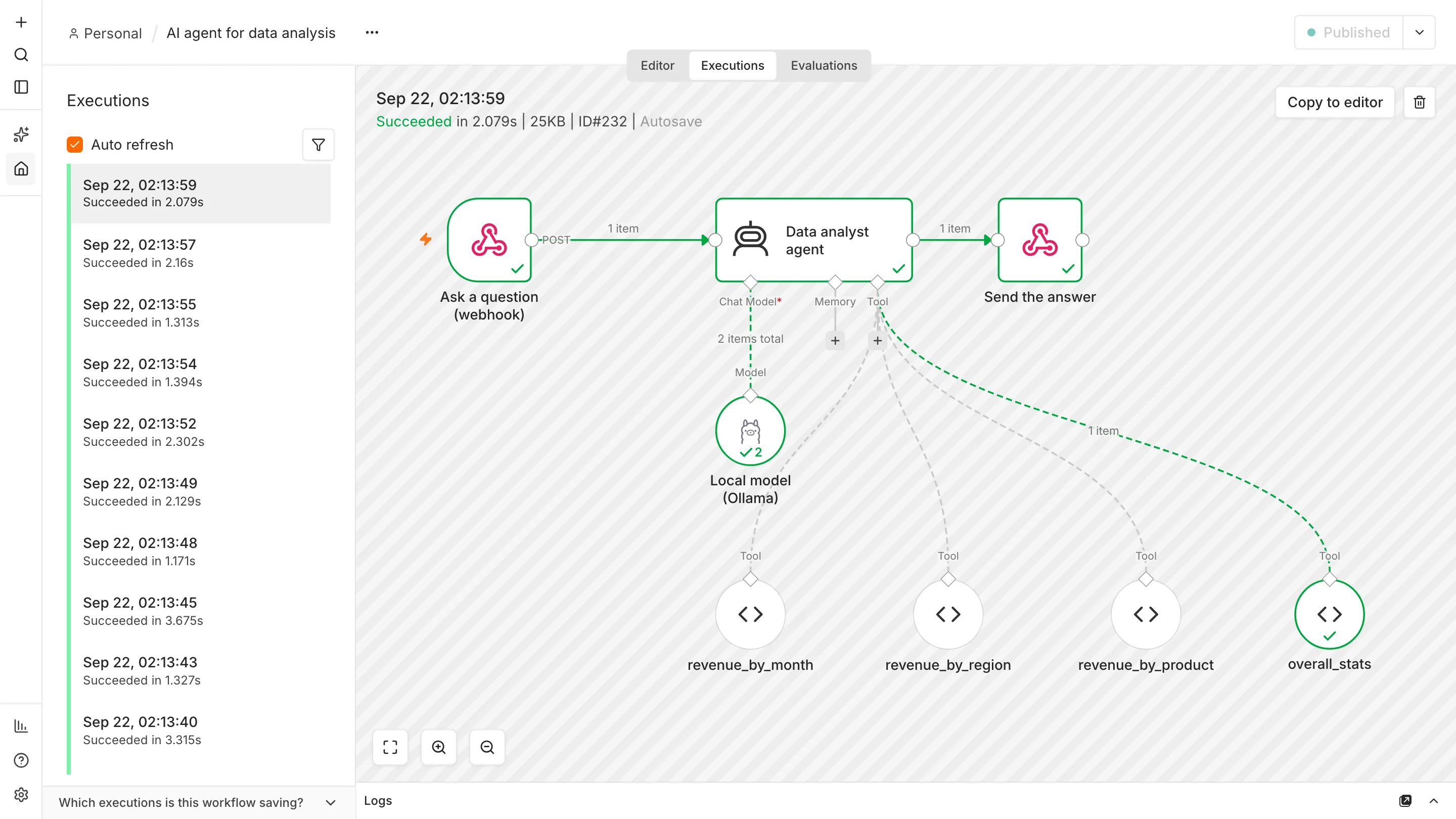
The agent is a loop. n8n sends the question and a list of available tools to the model. The model either answers or asks for a tool. n8n runs that tool, gives the result back, and the model writes the final answer. You build it from four parts:
| Part | What we used | Job |
|---|---|---|
| Trigger | Webhook (POST /ask-data) | Receives the question |
| Model | Llama 3.2 3B via Ollama | Understands the question and writes the answer |
| Agent | AI Agent node | Runs the tool loop with a system message |
| Tools | Four Code tool nodes | Return numbers from the data |
The data is a made-up sales table: 72 rows covering six months (January to June 2026), three regions and four products, totalling $341,890. Because we invented it, we know the correct answer to every question. You would replace it with your own sheet or database.
Set up the free local model
Install Ollama from ollama.com, then download the model (about 2 GB):
ollama pull llama3.2:3bIn n8n, add an Ollama credential with the base URL http://127.0.0.1:11434. We first used localhost and got “fetch failed” because it resolved to an address the server was not listening on; the numeric address fixed it. If you have not installed n8n, see how to use n8n for free. You can download the finished workflow (JSON).
Build the agent in n8n

- Webhook. POST to
ask-data, responding with a Respond to Webhook node. - AI Agent node. Prompt:
{{ $json.body.question }}. Add the system message shown below. - Ollama Chat Model. Model
llama3.2:3b, temperature 0 so answers are as repeatable as possible. - Four Code tools. Each holds the data and returns a ready-made summary as text.
- Respond to Webhook. Sends back the question and
{{ $json.output }}.
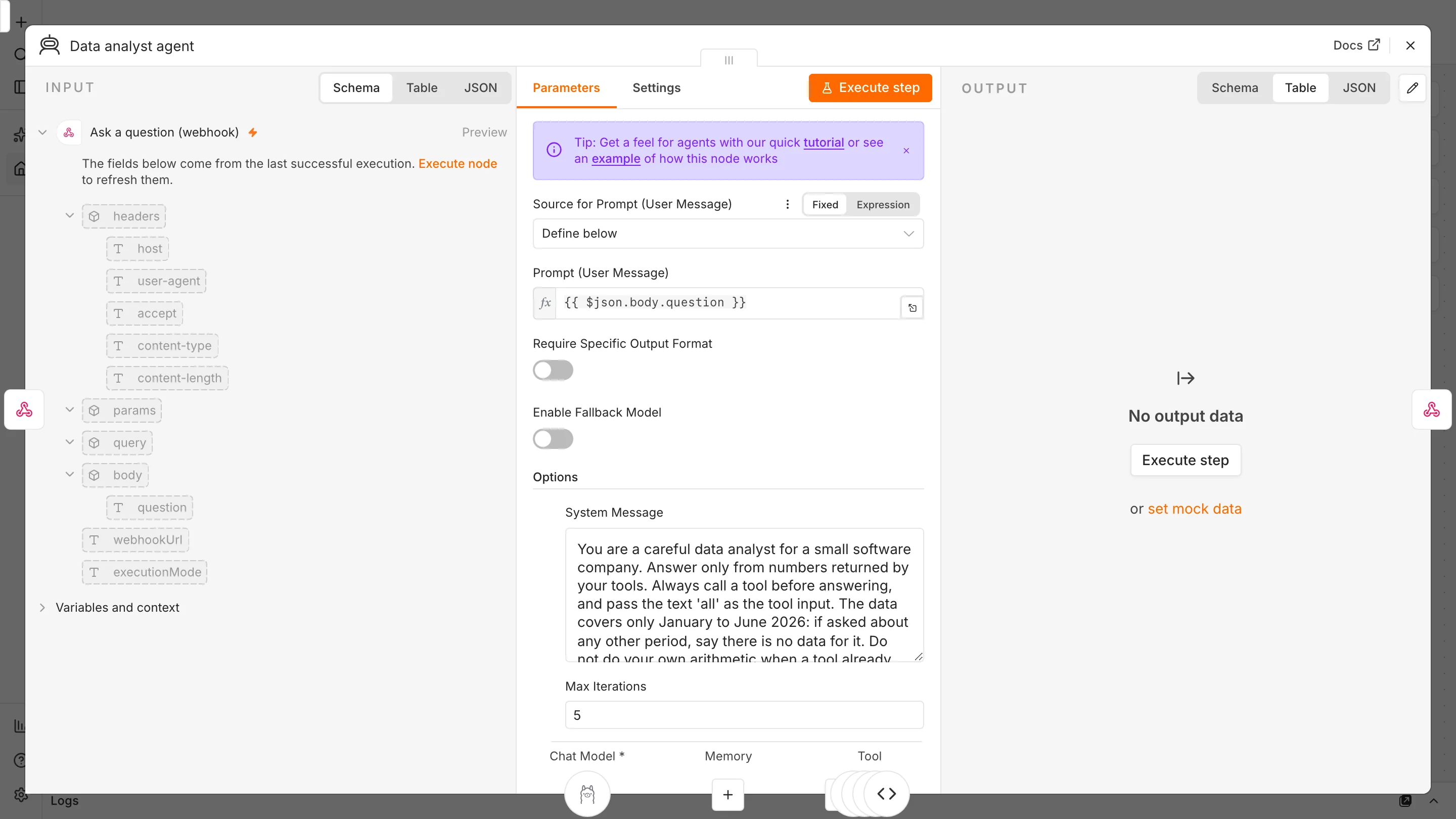
Our final system message:
You are a careful data analyst for a small software company. Answer only from numbers returned by your tools. Always call a tool before answering, and pass the text 'all' as the tool input. The data covers only January to June 2026: if asked about any other period, say there is no data for it. Do not do your own arithmetic when a tool already returns the figure. If the tools cannot answer, say so instead of guessing.Ask it a question:
curl -X POST http://localhost:5678/webhook/ask-data -H 'Content-Type: application/json' \
  -d '{"question":"Which region earns the most revenue?"}'
We tested it on nine questions
We ran each question through two versions and compared the answer with the true figure. Version 1 had three simple tools that returned unsorted totals. Version 3 has ranked lists, a fourth overall_stats tool that returns the total, average and growth, and the stricter system message. (Version 2, an in-between step, answered July with a June figure, which is what led to the “no data for other periods” rule.)
| Question | True answer | Version 1 | Version 3 |
|---|---|---|---|
| Which month had the highest revenue? | June, $65,660 | ✓ Correct | ✓ Correct |
| Which region earns the most? | East, $129,570 | ✓ Correct | ✓ Correct |
| What are our best-selling products? | Team, Pro, Starter, Add-on | ✗ Right numbers, wrong order | ✓ Correct |
| Total revenue for six months? | $341,890 | ✗ $343,190 (added wrongly) | ✓ Correct |
| Growth, January to June? | 37.5% | ✗ 37.4% (rounding slip) | ✓ 37.5% |
| Revenue in July 2026? | No data | ✓ Said not provided | ✗ Said “$0” |
| Which product sells the most? | Team Plan, $151,570 | ✓ Correct | ✓ Correct |
| Which region earns the least? | North, $93,030 | ✗ Said East | ✓ Correct |
| Average monthly revenue? | $56,982 | ✗ $62,665 (wrong sum) | ✓ Correct |
What we learned. Version 1 was fluent and confident even when wrong: it added six numbers and got $343,190, and it called East the lowest region right after naming it the highest. The 3B model retrieves numbers reliably but is weak at sorting and arithmetic. Version 3 fixed that by doing the maths in the tools, where JavaScript is exact, and letting the model only choose a tool and phrase the answer.
What still fails. Asked about July, version 3 answered “$0” when it should say there is no data. It is a small test (nine questions, one run each), so treat the score as an illustration, not a benchmark. Even at temperature 0, wording changes can change which tool gets picked: in version 2 a growth question sometimes returned “I couldn’t retrieve the data” until we told the agent to pass a fixed input.
Rules for reliable data agents: (1) tools return finished numbers, sorted and totalled; (2) the model never calculates; (3) the system message states what data exists; (4) you test with questions whose answers you already know; (5) a person checks anything that drives money or decisions.
What does it cost to run?
- Software and model: $0 (n8n Community Edition and Ollama are free).
- Hardware: a modern laptop handled the 3B model; larger models need more memory and are slower.
- Speed: 1 to 5 seconds per answer in our runs.
- Privacy: nothing left our machine, which matters for sensitive business data.
- Upgrade path: for harder questions you can swap the model node for a hosted model, which costs money per use and sends your data to that provider.
Make it useful on your data
- Replace the embedded table with a Google Sheets, database or CSV node and keep the tools returning pre-computed summaries.
- Add a tool per question type your team really asks, such as revenue by customer or refunds by week.
- Keep a list of test questions with known answers and rerun it whenever you change the model or prompt.
- Pair it with a scheduled report, like our automated SEO report, so people get answers without asking.
Frequently asked questions
What is an AI agent for data analysis?
It is a language model connected to tools that read your data. The model decides which tool to call, then explains the result in plain language.
Can a free local model analyze data reliably?
For looking up figures, yes, when tools return ready-made numbers. In our test a 3B model made arithmetic and sorting mistakes until we moved that work into the tools, and it still answered one no-data question incorrectly.
Do I need to code to build a data analysis agent in n8n?
You connect nodes visually, but the tools that summarize data use a little JavaScript. The downloadable workflow includes working examples.
Is it safe to give an AI agent my business data?
A local model keeps data on your machine. With hosted models, your data goes to the provider, so check their terms first. Either way, give the agent read-only access and review important answers.
Which model should I use?
We tested only Llama 3.2 3B. Larger models are generally better at reasoning but need more memory, so test with your own questions before choosing.
Sources and further reading
- n8n AI Agent node and Code tool documentation.
- Llama 3.2 on Ollama and Ollama.

