Automate Daily Standup Reports: Pull Updates into One Digest
You can automate daily standup reports in n8n without a live call: pull every team update into one workflow, flag anything that sounds like a blocker, and catch whoever has not reported in. We built it on a local n8n install, ran it on five sample updates, and caught a real false-positive bug along the way that would have flagged a clean update as a blocker.
- Four of five sample updates were collected and checked automatically; the fifth was flagged as missing.
- A keyword check caught two real blockers while correctly skipping a “no blockers” update.
- The digest separates blockers from routine updates so a two-minute read catches what matters.
- Runs on free, built-in n8n nodes with no AI subscription required.
How to automate daily standup reports
A standup digest only has to do three things well: pull in every update from wherever your team actually writes them, say plainly who has not reported in, and surface anything that sounds like a blocker so it does not sit quietly for two days. Everything past that is decoration.
Our workflow treats each update as one record with a name, a source (Slack or a sheet) and the text itself, checks it for blocker language, and flags anyone who has not submitted anything at all.
This is the fastest way to automate daily report delivery without adding another meeting to the calendar.
Build the daily standup digest in n8n
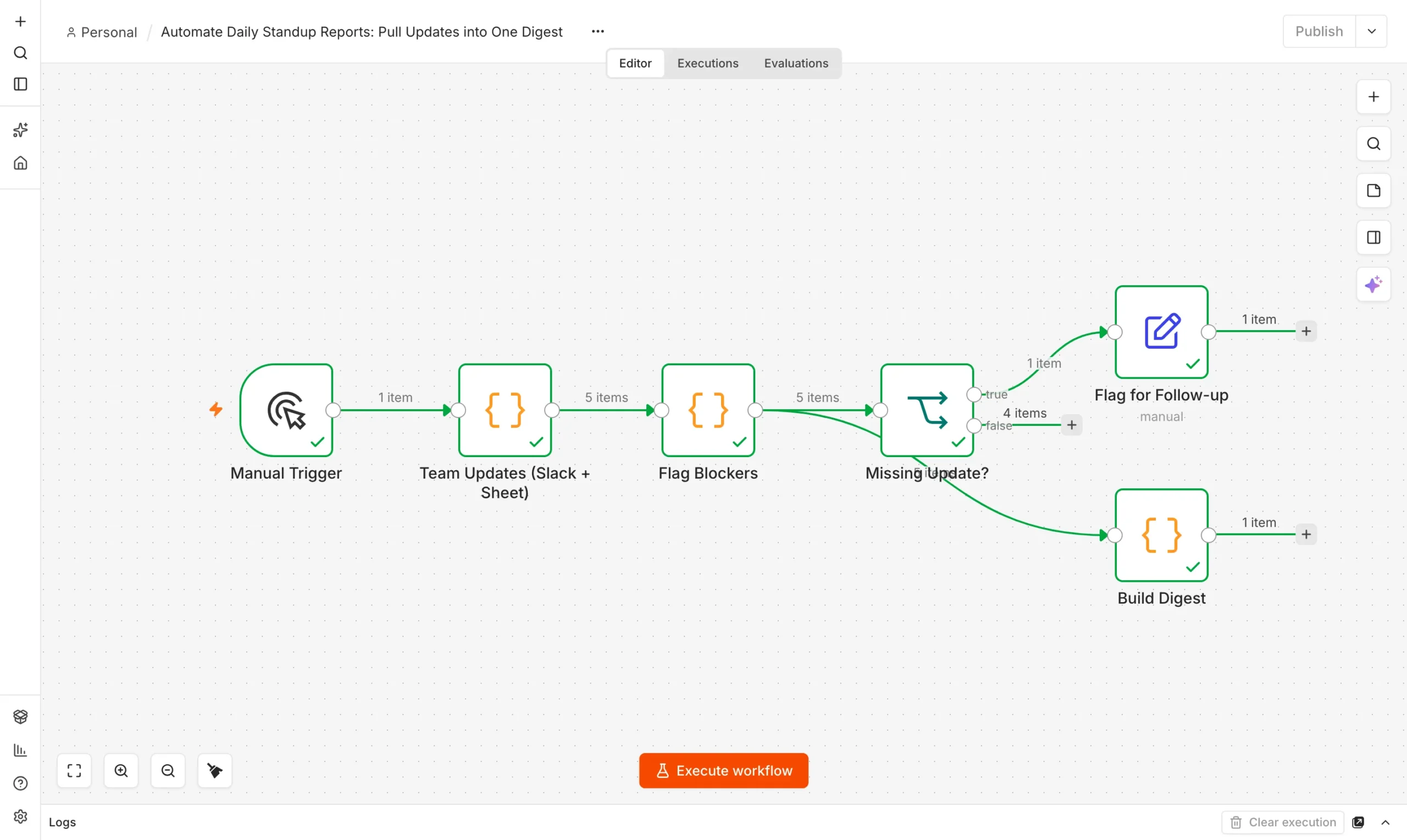
Start with n8n running. Our free n8n setup guide covers the install. The workflow has four steps.
Team updates
A Code node returns five sample updates pulled from Slack and a sheet.
Collect
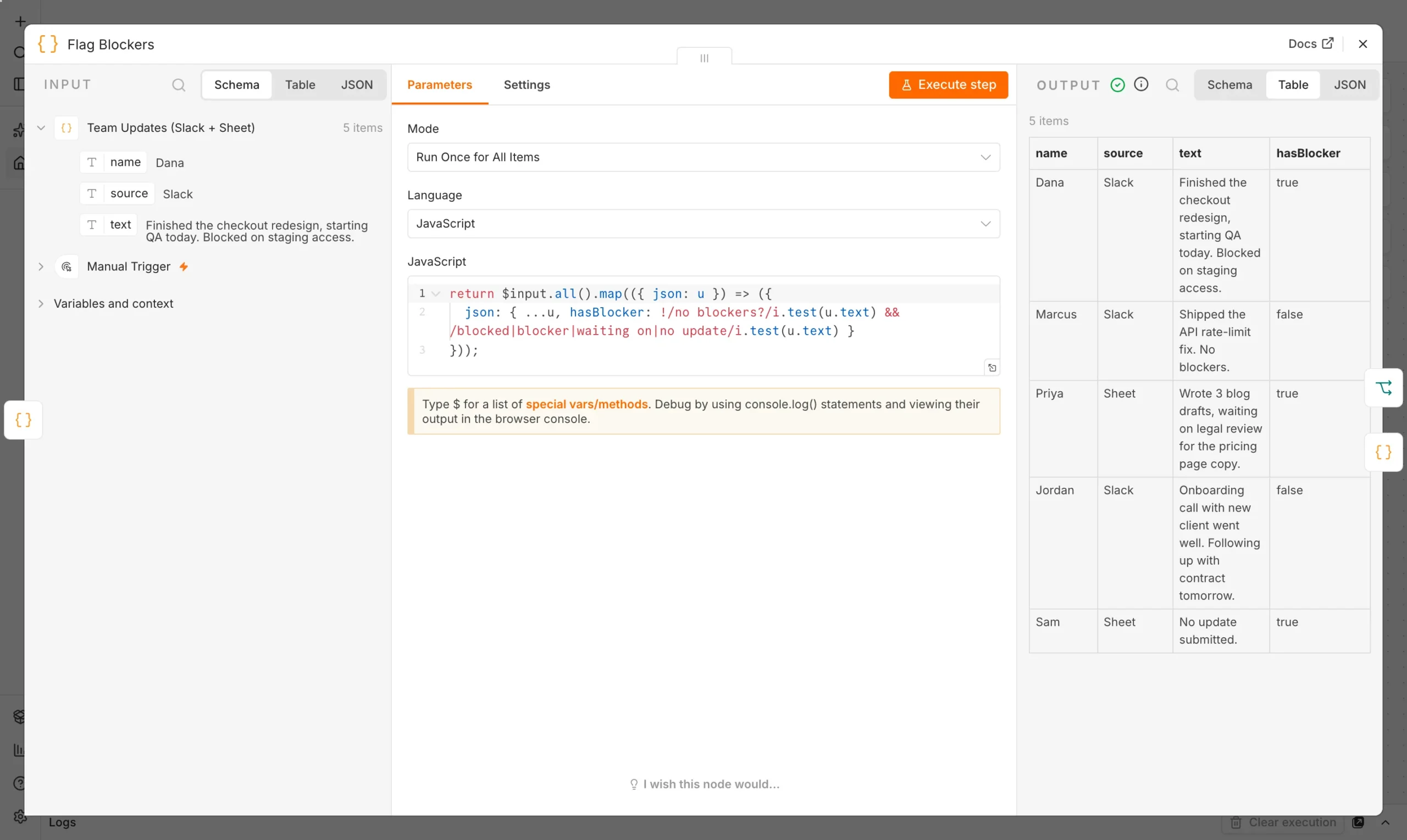
Flag Blockers
A Code node checks each update’s text for blocker language.
Flag
Missing update?
An If node catches anyone who submitted nothing.
Check
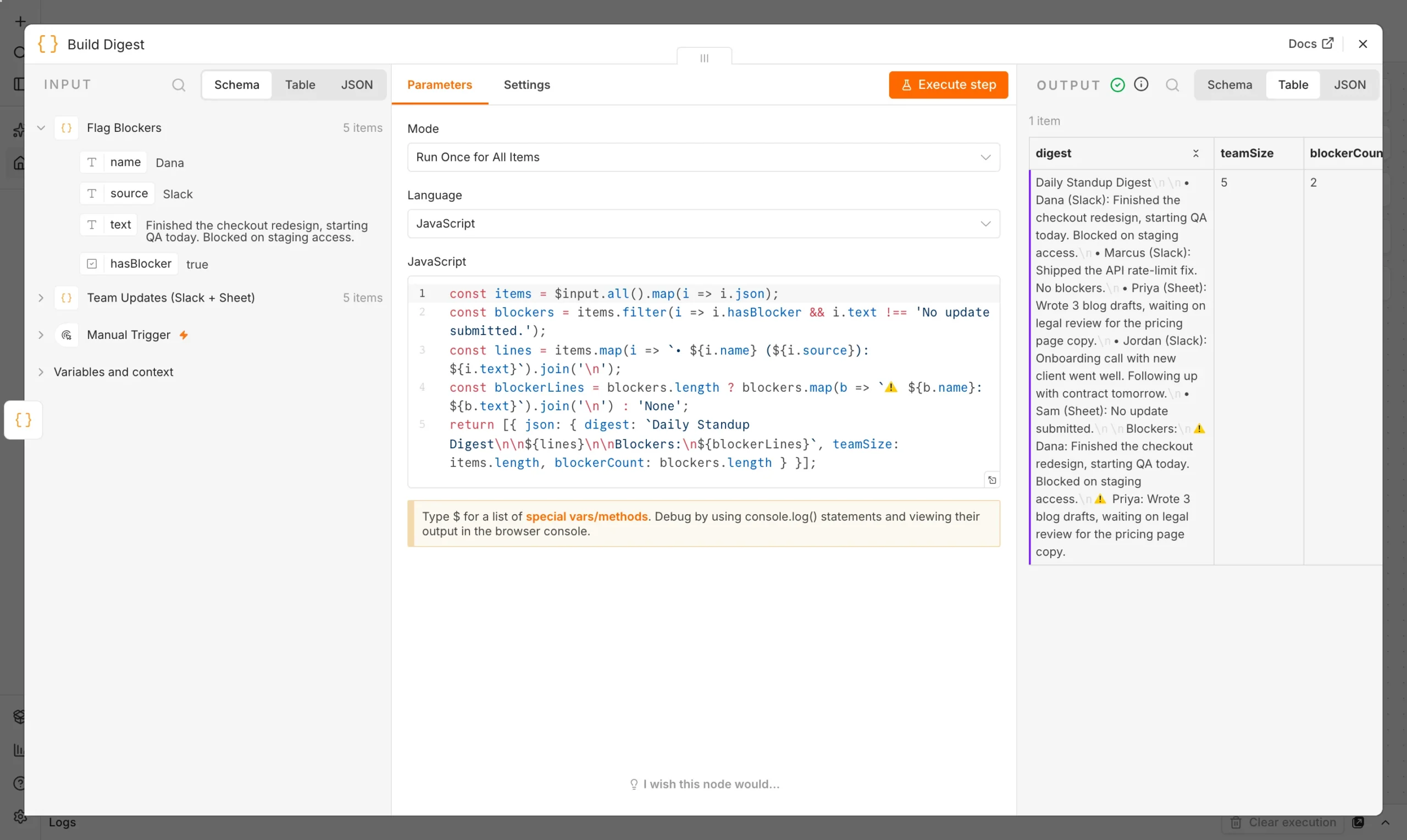
Build Digest
A Code node writes the final digest, blockers listed separately.
Digest
The blocker check is a simple keyword match, with one deliberate exception: a literal “no blockers” should not itself be flagged as a blocker, which is an easy false positive if you are not careful with the regex.
return $input.all().map(({ json: u }) => ({
  json: {
    ...u,
    hasBlocker: !/no blockers?/i.test(u.text)
             && /blocked|blocker|waiting on|no update/i.test(u.text)
  }
}));
The digest builder separates the full list of updates from a shorter “Blockers” section, so the people who only have two minutes can read the blockers and move on.
What happened when we ran it
We ran the workflow on five sample updates: three from Slack, two from a sheet. Every node finished with a green check.
Sam’s row read exactly “No update submitted,” caught by the Missing Update check and routed to a separate follow-up action.
• Dana (Slack): Finished the checkout redesign, starting QA today. Blocked on staging access.
• Marcus (Slack): Shipped the API rate-limit fix. No blockers.
• Priya (Sheet): Wrote 3 blog drafts, waiting on legal review for the pricing page copy.
• Jordan (Slack): Onboarding call with new client went well. Following up with contract tomorrow.
• Sam (Sheet): No update submitted.
Blockers: Dana (staging access), Priya (legal review)
Marcus’s line (“No blockers”) was correctly left out of the blockers section, which is the exact bug an unqualified regex match would have caused: the word “blockers” appears in his sentence even though he has none. Catching this kind of false positive before it reaches a real team’s inbox is most of the actual engineering work in a workflow like this.
Make the digest useful every day
- Pull from where people actually write. Swap the sample node for a real Slack channel read, a Google Sheet, or both.
- Run it automatically. Replace the Manual Trigger with a Schedule Trigger set for 9am on weekdays.
- Deliver it where it gets read. Post the digest to a Slack channel or email it, rather than leaving it in n8n for someone to check.
- Escalate real blockers. A blocker that repeats for more than a day should trigger a direct message, not just sit in the daily digest.
If meetings are where your team actually surfaces blockers, pair this with our AI agent for meeting notes so both async updates and live discussions end up in one place.
Why async beats a live standup for most teams
A 15-minute daily standup call costs more than 15 minutes once you count context-switching for everyone attending, and for distributed teams it forces someone to join outside their working hours. An automated digest does not replace the value of a live standup entirely – it will not catch tone, and it cannot improvise a quick follow-up question the way a real conversation can – but it reliably captures the actual content of most standups: what got done, what is blocked, and who has not checked in. Teams that switch to an async-first digest typically keep a much shorter live sync (or none at all) for the days nothing is blocked, and use the saved time for the days something actually needs discussion.
Digest versus a project management tool’s own status view
Tools like Jira, Linear and Asana already show task status, so it is fair to ask why a separate digest is worth building. The answer is that task status and a standup update are not the same thing: a task can show “in progress” in Jira for a week with no indication that it is actually blocked, because nobody updates ticket status in real time. A standup update is the human layer on top of the ticket – the “actually, I’m stuck because…” that a status field does not capture. Pulling updates from Slack or a quick form captures that human context, which is exactly what a pure ticket-status dashboard misses.
Checklist before you turn this on for a real team
Before you automate a daily report for a real team, run through this short checklist.
- Confirm the source (Slack channel, form or sheet) is one every team member already checks or submits to daily, so adoption does not require a new habit.
- Run the workflow for a week in “review only” mode – generate the digest but have a human glance at it before it goes to the full team, to catch any keyword false positives early.
- Decide who owns the keyword list going forward, so it gets updated as your team’s language shifts rather than quietly going stale.
- Set up the missing-update follow-up as a gentle nudge, not a public callout – a quiet DM works better than naming someone in a channel everyone reads.
Common mistakes when automating a standup digest
- Flagging too aggressively. A keyword list that is too broad (matching “block” anywhere, for instance) will catch unrelated sentences and erode trust in the digest fast – test it against real, varied update text before trusting it.
- Treating silence as fine. A missing update is not the same as a clean one; without an explicit check, a quiet team member can go unnoticed for days.
- Sending the digest somewhere no one checks. A beautifully built workflow that posts to a channel nobody reads accomplishes nothing – confirm the delivery channel matches where your team actually looks each morning.
- Not revisiting the rules. Team language shifts over time; revisit the blocker keyword list every month or two against real recent updates to catch drift.
Frequently asked questions
Common questions about how to automate daily report delivery for a team.
How do I automate a daily standup report without a meeting?
Pull written updates from Slack or a form into one workflow, flag blockers with a keyword check, and deliver the result as a digest instead of holding a live call.
What counts as a blocker in the digest?
Our sample checks for words like “blocked,” “waiting on” and “blocker,” while explicitly excluding “no blockers” so a clean update is not misread as a problem.
Can it tell me who has not reported?
Yes. An If node checks for an empty or placeholder update and routes that person to a separate follow-up action instead of burying them in the main digest.
Does this replace live standups entirely?
Not necessarily – many teams keep a short live sync for days with real blockers and skip it entirely on quiet days, using the digest to decide which is which.
Can I customize what counts as a blocker?
Yes, the keyword list lives in one Code node. Add phrases specific to your team’s language, like a tool name that is commonly the source of delays.
What if two team members report the same blocker?
The digest lists blockers per person rather than deduplicating, which is useful on its own – seeing the same dependency named by two people is a strong signal it needs attention today.
Does this work for teams across different time zones?
Yes, since it is async by design. Each person submits their update whenever their day starts, and the digest builder runs once everyone’s input is in, regardless of time zone.