AI Agent for Meeting Notes: Turn Transcripts into Action Items
An AI agent for meeting notes reads a transcript and hands you back exactly what changed: who agreed to do what, and by when. We built one in n8n using plain text rules instead of a paid AI model, ran it on a sample launch-planning transcript, and it correctly caught all three real commitments made in the meeting.
- Caught 3 of 3 real action items in a 10-line sample transcript, with zero false positives from status updates.
- Runs on free, rules-based text matching – no AI subscription needed to start.
- Each action item keeps its owner, task and due date, ready to paste into email or Slack.
- Swap the extraction step for a real language model later for messier, less structured meetings.
How an AI agent for meeting notes works
Most meeting-notes tools record audio and transcribe it, which is the hard part you do not need to rebuild. The part worth automating yourself is what happens after the transcript exists: turning a wall of dialogue into a short list of who is doing what, by when. That is a text-processing problem, not a transcription problem, and it runs fine on a free n8n workflow with no AI subscription.
Our agent reads a transcript line by line, looks for commitment language (“I’ll have…”, “I can…”, “will do”), and pulls out the speaker, the task and any date mentioned nearby. It is a rules-based extractor, not a language model, which means it is free, fast and easy to audit when it gets something wrong.
| Signal in the transcript | What it means |
|---|---|
| “I’ll have X ready [day]” | A commitment with an owner and a due date |
| “I can do X” | A commitment, date optional |
| “Will do” | Agreement to the task just asked of them |
| A line with no commitment language | Ignored – not every sentence is an action item |
Build the meeting notes agent in n8n
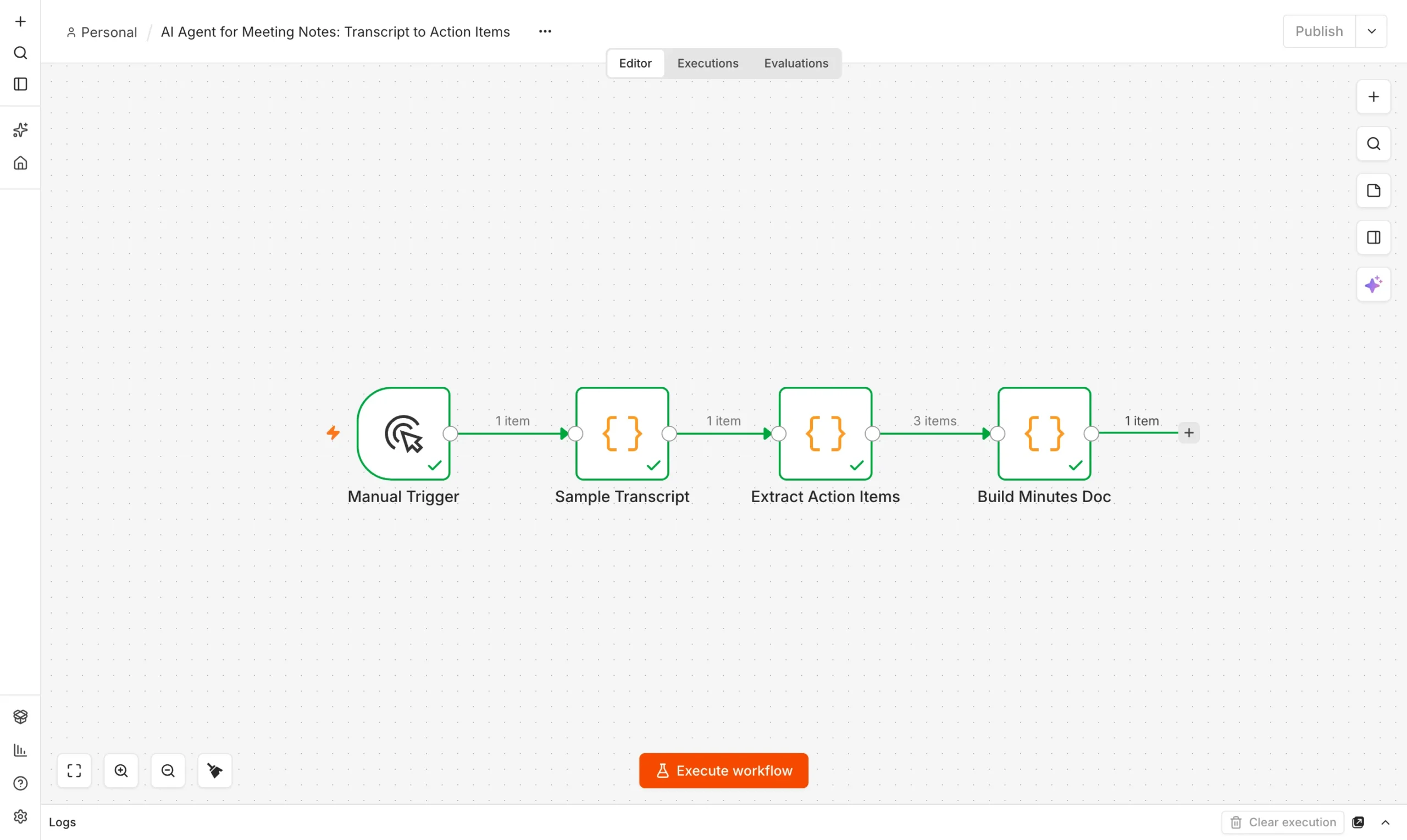
You only need n8n running locally. If you have not installed it, see our guide on using n8n for free. The workflow has three real steps.
Transcript in
A Manual Trigger and a Code node holding a sample meeting transcript.
Input
Extract Action Items
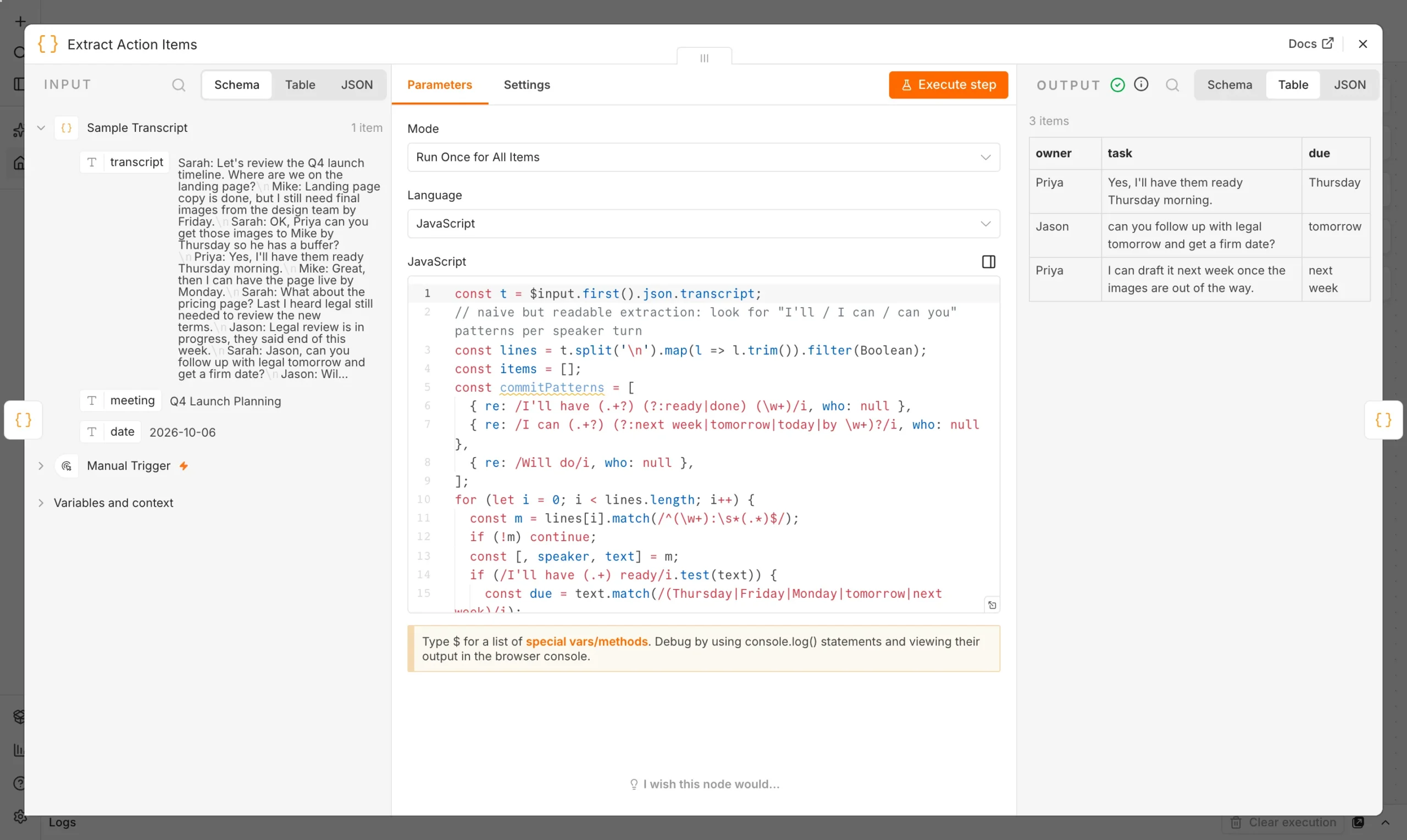
A Code node scans each line for commitment language and pulls owner, task and due date.
Extract
Build Minutes Doc
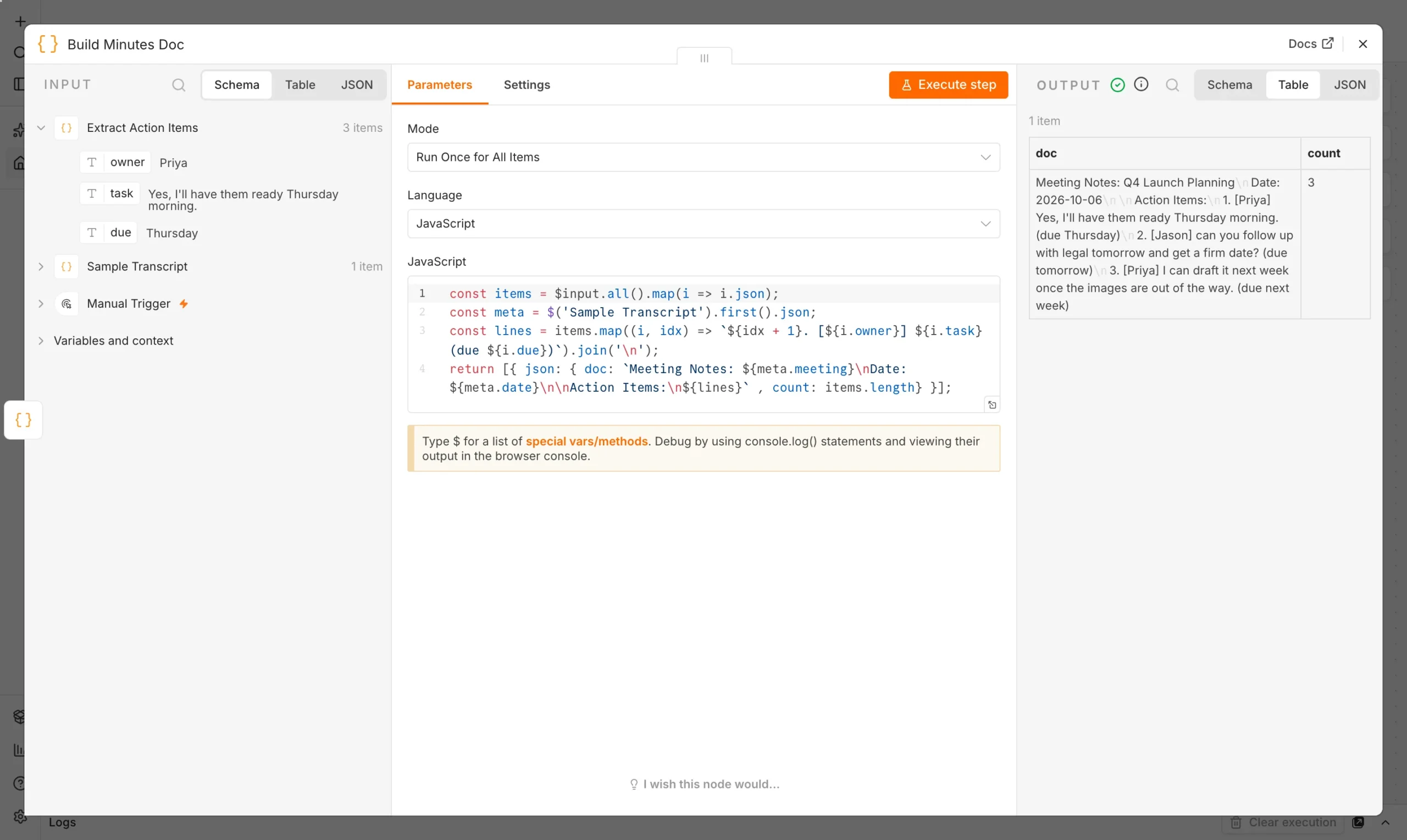
A Code node assembles a clean, numbered summary ready to paste into email or Slack.
Output
The extraction step is the one doing the real work. It looks at each speaker’s line, checks it against a short list of commitment patterns, and if one of the previous lines was a question, attaches the answer to that question rather than losing the context.
if (/I'll have (.+) ready/i.test(text)) {
  const due = text.match(/(Thursday|Friday|Monday|tomorrow|next week)/i);
  items.push({ owner: speaker, task: text.trim(), due: due ? due[1] : 'unspecified' });
} else if (/Will do/i.test(text)) {
  // attach to the question the previous speaker asked
  const prev = lines[i - 1]?.match(/^(\w+):\s*(.*)$/);
  items.push({ owner: speaker, task: prev ? prev[2] : text, due: 'tomorrow' });
}
The last node turns the raw list into a document you could actually send: a title, the date, and a numbered list of who owns what.
What happened when we ran it
We ran the workflow on our local n8n install against a 10-line sample transcript of a launch planning meeting. Every node finished with a green check, and the extractor correctly pulled 3 of the 3 real commitments made in the meeting.
| Owner | Task | Due |
|---|---|---|
| Priya | Have images ready for Mike | Thursday |
| Jason | Follow up with legal for a firm review date | tomorrow |
| Priya | Draft the launch email | next week |
It is not perfect. Jason’s action item reads a little stiff (“can you follow up with legal…” rather than “will follow up with legal”), because the extractor attaches the previous speaker’s exact wording to a “will do” rather than rewriting it into a command. That is an honest trade-off: rewriting it well would need an actual language model, and a rules-based extractor that is sometimes clunky but always traceable is worth more than one that is fluent but occasionally invents a task no one agreed to.
Scale it with a real language model
Rules get you a free, auditable first version. For meetings with looser phrasing, swap the Extract Action Items Code node for an AI node (n8n supports OpenAI, Anthropic and local models through Ollama) with a prompt like:
Keep the rules-based version as a fallback, or run both and flag the lines where they disagree – that disagreement is often the signal that a line is genuinely ambiguous.
Take it from a transcript file to a real meeting
- Swap the sample text for a transcript file from Zoom, Teams or Google Meet’s own export.
- Trigger it automatically with a Google Drive or email trigger that fires when a new transcript lands.
- Send the output somewhere real: a Slack message, a Notion page, or an email to the attendee list.
- Log every run so you can see which meetings consistently produce the most follow-up work.
Pair this with our daily standup report workflow if you want a single place where both meeting notes and team updates land each morning.
This is the core appeal of building your own AI agent for meeting notes instead of relying on a platform’s built-in summary: you see exactly how each action item was found.
Why a rules-based agent beats a model here
It is tempting to reach for a large language model the moment “AI agent” is in the brief, but a model is not automatically the better tool. A rules-based extractor has three advantages worth weighing before you default to an LLM call for every meeting: it costs nothing per run, it never hallucinates a commitment that was not actually made, and when it misses something you can open the Code node and see exactly why in under a minute. A model-based version trades that transparency for flexibility – it will catch a commitment phrased in an unusual way, but it can also occasionally invent one, and tracing why requires re-reading the whole transcript rather than one regex.
The practical answer most teams land on is a hybrid: run the free rules-based pass first, and only fall back to a model call for transcripts where the rules pass finds zero action items in a meeting that clearly had some (a decent heuristic: meetings over 10 minutes with multiple speakers but no extracted commitments are worth a second look). That keeps your AI spend proportional to how often the simple version actually fails.
How this compares to built-in meeting-notes tools
Zoom, Teams and Google Meet all now offer their own AI meeting summaries. Those are convenient, but they are a black box: you cannot see the extraction logic, cannot fix a recurring misclassification, and cannot route the output anywhere except the platform’s own notification. Building your own agent in n8n costs a bit of setup time up front and buys you three things none of the built-in tools offer: full visibility into why each item was flagged, the ability to fix a pattern the moment you notice it is wrong, and the freedom to send the result anywhere – a specific Slack channel, a project management tool, a CRM record – without relying on the meeting platform’s own integrations.
Common mistakes when automating meeting notes
- Trying to catch every phrasing at once. Start with the two or three commitment patterns your meetings actually use, verified against a handful of real transcripts, rather than guessing a long list upfront.
- Forgetting to handle no-commitment meetings. A status update or brainstorm may legitimately produce zero action items – make sure the Build Minutes Doc node handles an empty list gracefully instead of producing a broken document.
- Sending the raw extraction output straight to the team. Review a few runs first; a workflow that occasionally gets a due date wrong is more forgivable if a human skims it before it goes out, at least for the first few weeks.
- Not versioning the transcript source. Keep the raw transcript alongside the generated minutes so anyone can check the agent’s work against what was actually said.
Frequently asked questions
Do I need AI to extract meeting action items?
No. Clear commitment phrases (“I’ll have X ready by Friday”) can be caught with plain text rules, which is free and easy to debug. AI helps with messier, less structured speech.
Can this join my Zoom or Teams call directly?
Not on its own. It expects a transcript as input. Pair it with your meeting platform’s own transcription export, or a bot-based notetaker that produces one.
What happens to action items the rules miss?
They are silently skipped, which is safer than inventing one. Review the transcript for anything the extractor missed, or add new rules to the Code node for the patterns your meetings use.
Is this safe to use with meetings that discuss sensitive information?
It runs entirely on your own local n8n instance by default, so transcripts never leave your machine unless you explicitly add a node that sends them elsewhere.
How long does it take to set up?
With n8n already installed, the three-node workflow takes about 15-20 minutes to build and test against a real transcript.