Leave Request Approval Workflow in n8n: Auto-Approve, Escalate or Decline
A leave request approval workflow in n8n can approve the easy requests instantly, send the tricky ones to a manager and decline the impossible ones with a clear reason. We built one on a local n8n install and ran it on five sample requests. Two were approved, two went to a manager and one was declined.
- Five sample requests were decided in one run: 2 approved, 2 sent to a manager and 1 declined.
- Three simple rules cover balance, length and team coverage.
- Each outcome gets a clear message that explains the reason.
- It uses only built-in n8n nodes on the free Community Edition.
The rules behind a leave request approval workflow
Most leave requests are easy. A day off with plenty of balance and a covered team needs no debate. A good workflow approves those instantly, sends the tricky ones to a manager and declines the impossible ones with a clear reason.
| Condition | Decision |
|---|---|
| Days requested are more than the balance | Decline, and explain the balance |
| 2 days or fewer and fewer than 2 teammates already off | Approve automatically |
| Longer than 2 days | Send to manager |
| 2 or more teammates already off | Send to manager |
These thresholds are our example. Set them to match your own policy and check local leave rules before relying on any automation.
Build the leave request workflow in n8n
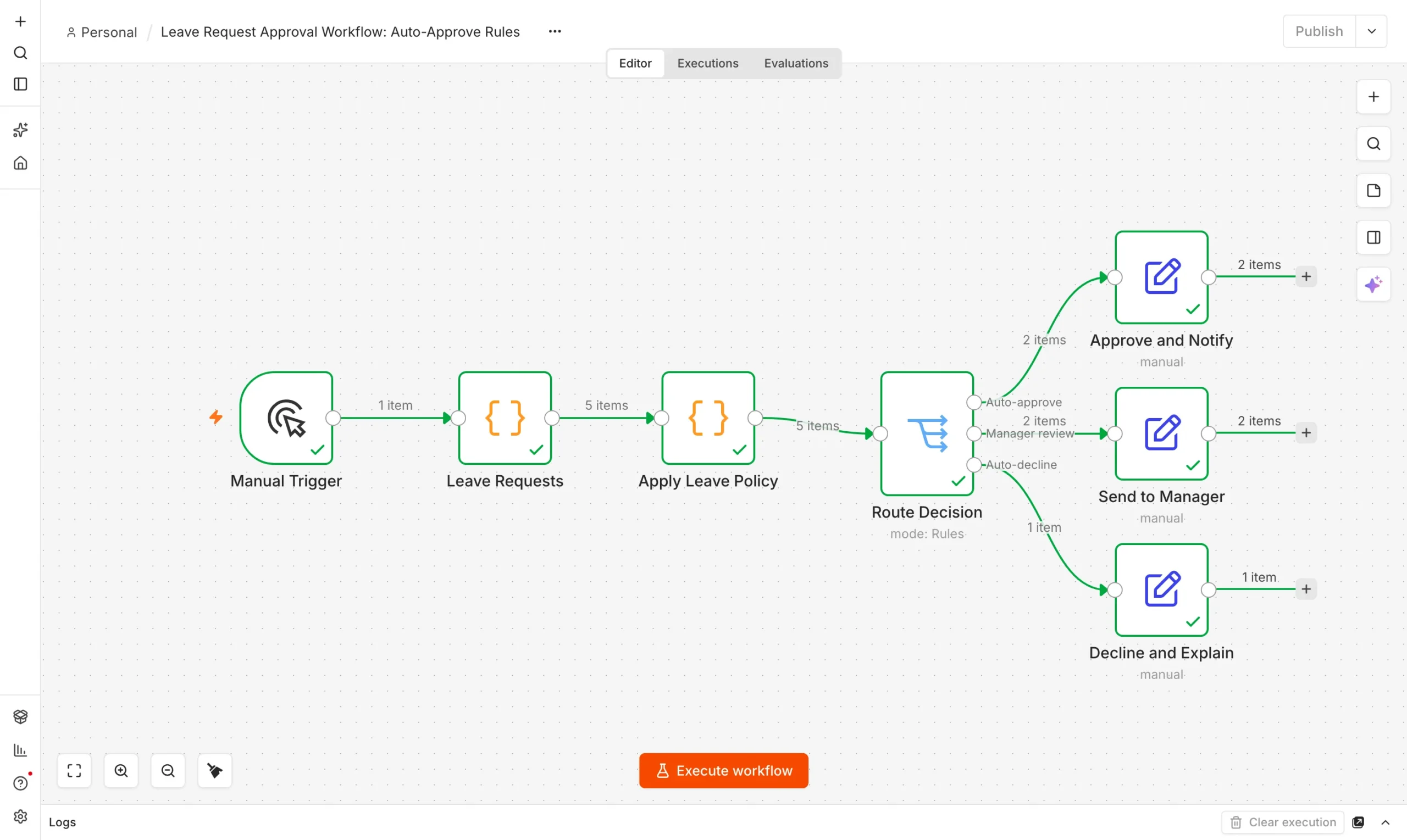
You need n8n running. See how to use n8n for free if you have not installed it. The build has four parts.
Leave requests
A Code node returns five sample requests with balance and team coverage.
Trigger
Apply policy
A Code node applies the rules and sets a decision and reason.
Decide
Route decision
A Switch node splits approve, review and decline.
Route
Notify
Set nodes write the status and message for each outcome.
Message
The policy lives in one Code node. It checks balance first, then short leave with team coverage, and sends everything else to a manager.
let decision, reason;
if (r.days > r.balance) { decision = 'decline'; reason = 'Not enough balance (' + r.balance + ' days left)'; }
else if (r.days <= 2 && r.teammatesOff < 2) { decision = 'approve'; reason = 'Short leave, team coverage OK'; }
else { decision = 'review'; reason = r.days > 2 ? 'Longer than 2 days' : 'Too many teammates already off'; }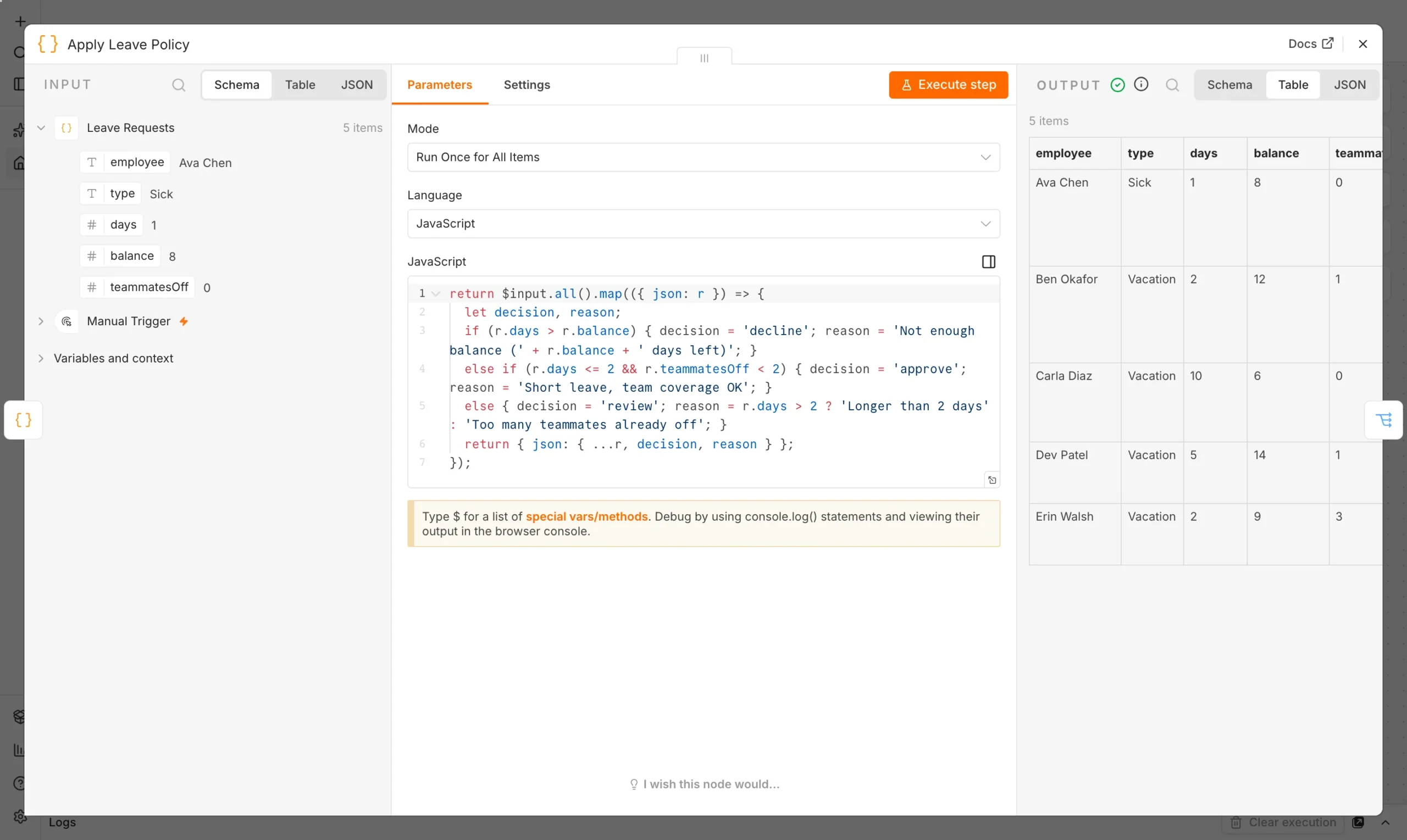
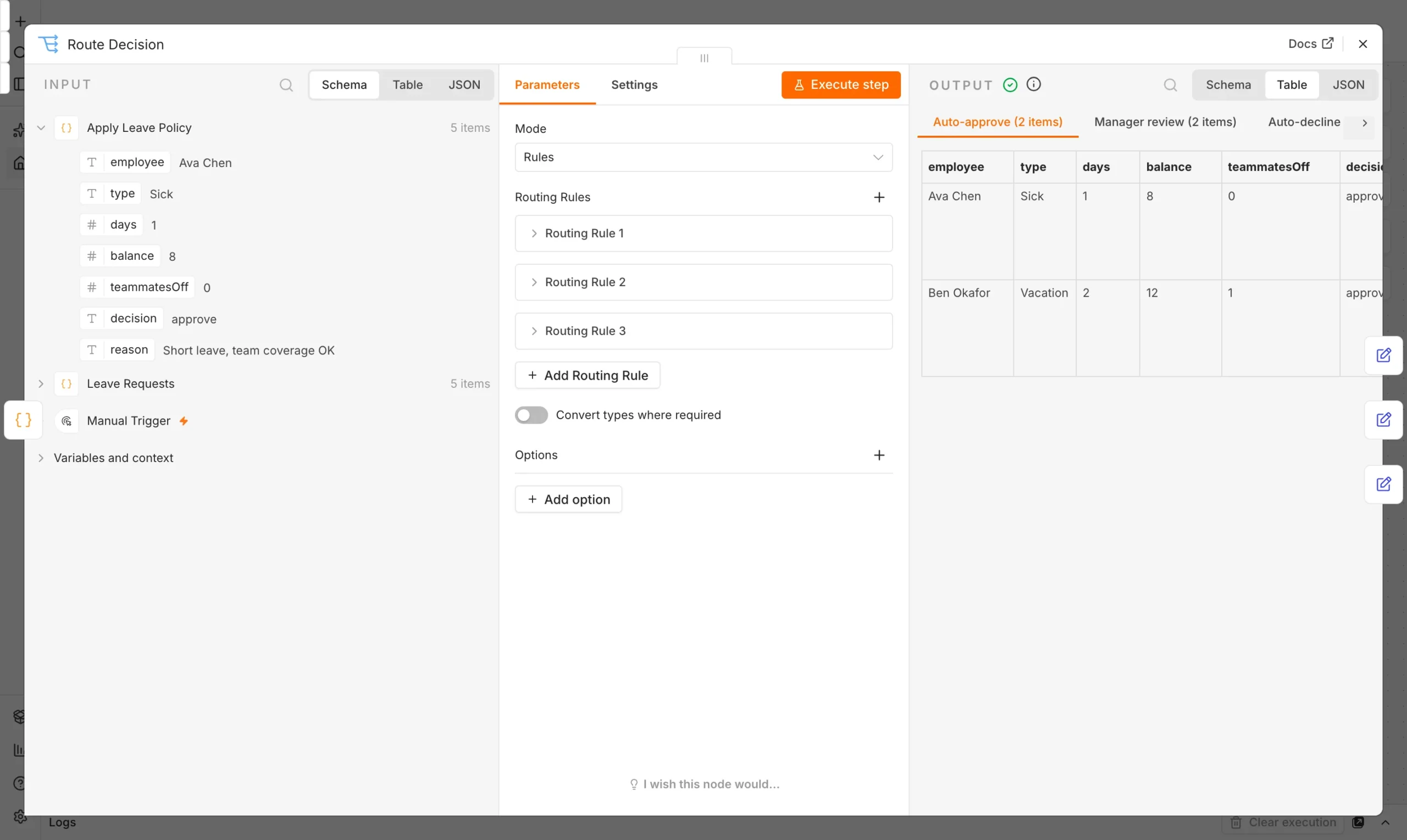
A Switch node reads the decision field and sends each request to Auto-approve, Manager review or Auto-decline.
What happened when we ran it
We ran five sample requests through the workflow on our local n8n install. All nodes finished with a green check.
| Employee | Request | Decision | Reason |
|---|---|---|---|
| Ava Chen | 1 day sick leave | Approved | Short leave, team coverage OK |
| Ben Okafor | 2 days vacation | Approved | Short leave, team coverage OK |
| Carla Diaz | 10 days vacation | Declined | Only 6 days left |
| Dev Patel | 5 days vacation | Manager review | Longer than 2 days |
| Erin Walsh | 2 days vacation | Manager review | 3 teammates already off |
Two requests were approved instantly, one was declined with a reason and two went to a manager. That is 3 of 5 requests handled by the leave request approval workflow with no human effort, while the judgment calls still reach a person.
Take the leave request approval workflow live
- Use a real trigger. Replace the sample node with a form or webhook that collects employee, dates, type and days.
- Look up the balance. Read it from your HR sheet or system so the number is always current.
- Send the messages. Add email or Slack nodes after each Set node.
- Add buttons for managers. Our invoice workflow shows the approve and reject pattern you can copy.
See the invoice approval workflow for that pattern, and our employee onboarding workflow for another HR process you can automate.
Edge cases to plan for
Real requests are messier than our five samples. Decide how you want to handle these before going live.
- Overlapping requests. Two people asking for the same days should both go to a manager.
- Public holidays. Count working days, not calendar days, or balances will drift.
- Part days. Store half days as 0.5 so the balance check stays accurate.
- Record keeping. Log every decision with its reason, so anyone can see why a request was approved or declined.
Frequently asked questions
Can n8n approve leave requests automatically?
Yes, for the simple cases. Rules approve short leave with enough balance and coverage, and everything else goes to a manager.
Should a manager approve every request?
Not necessarily. Auto-approving low-risk requests saves time, while longer or riskier ones still get a person.
Does a leave request approval workflow replace HR software?
No. It automates the decision step. You still need a reliable place to store balances and records.