Automated Invoice Reminders in n8n: Build a 3-Stage Overdue Workflow
Automated invoice reminders stop you chasing late payers by hand. In n8n, one workflow can check every due date, work out how overdue each invoice is and write a friendly, firm or final message to match. We built it on a local n8n install and ran it on five sample invoices.
- Five sample invoices were sorted into four outcomes in a single run.
- Three overdue stages match tone to lateness: friendly, firm and final.
- The workflow writes each message; add a Gmail or SMTP node to send it.
- It uses only built-in n8n nodes on the free Community Edition.
How automated invoice reminders work
Late payments usually come from forgetting, not refusing. A steady reminder sequence fixes most of it. The trick is matching the tone to how late the invoice is, so a friendly nudge never sounds like a threat and a final notice never sounds casual.
| Days overdue | Stage | Tone |
|---|---|---|
| 0 or less | Skip | No message yet |
| 1 to 7 | Friendly | Polite nudge |
| 8 to 30 | Firm | Clear request for a payment date |
| 31 or more | Final | Deadline and consequence |
Our workflow does the date math for you, then writes the right message for each invoice.
Build the invoice reminder workflow in n8n
Start with n8n running locally. Our guide to using n8n for free covers the install. Then build the automated invoice reminders in four steps.
Open invoices
A Code node returns five sample invoices with due dates.
Trigger
Days overdue
A second Code node compares today with each due date.
Calculate
Pick stage
A Switch node sorts invoices into four outputs.
Route
Write message
Set nodes create the subject and body for each stage.
Message
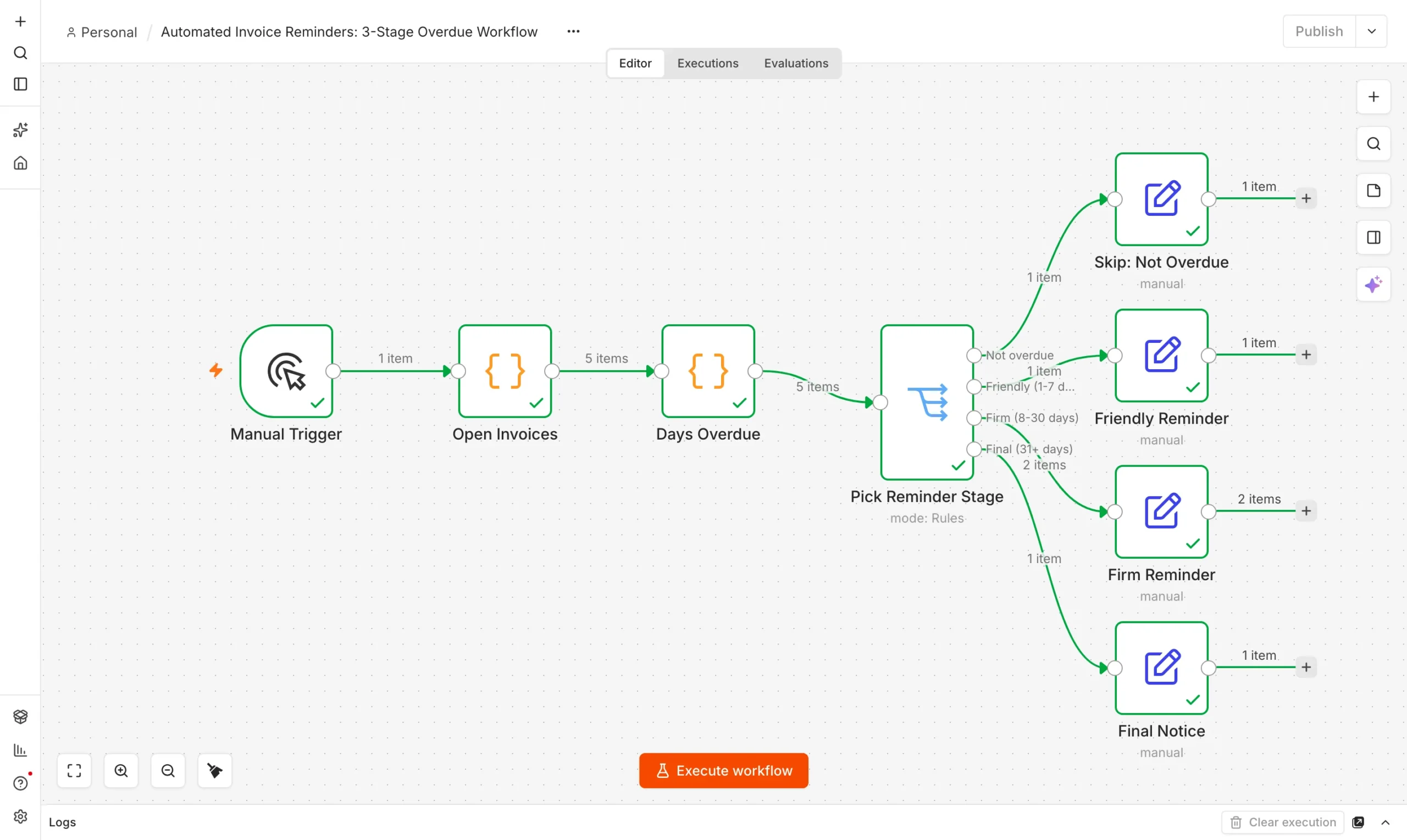
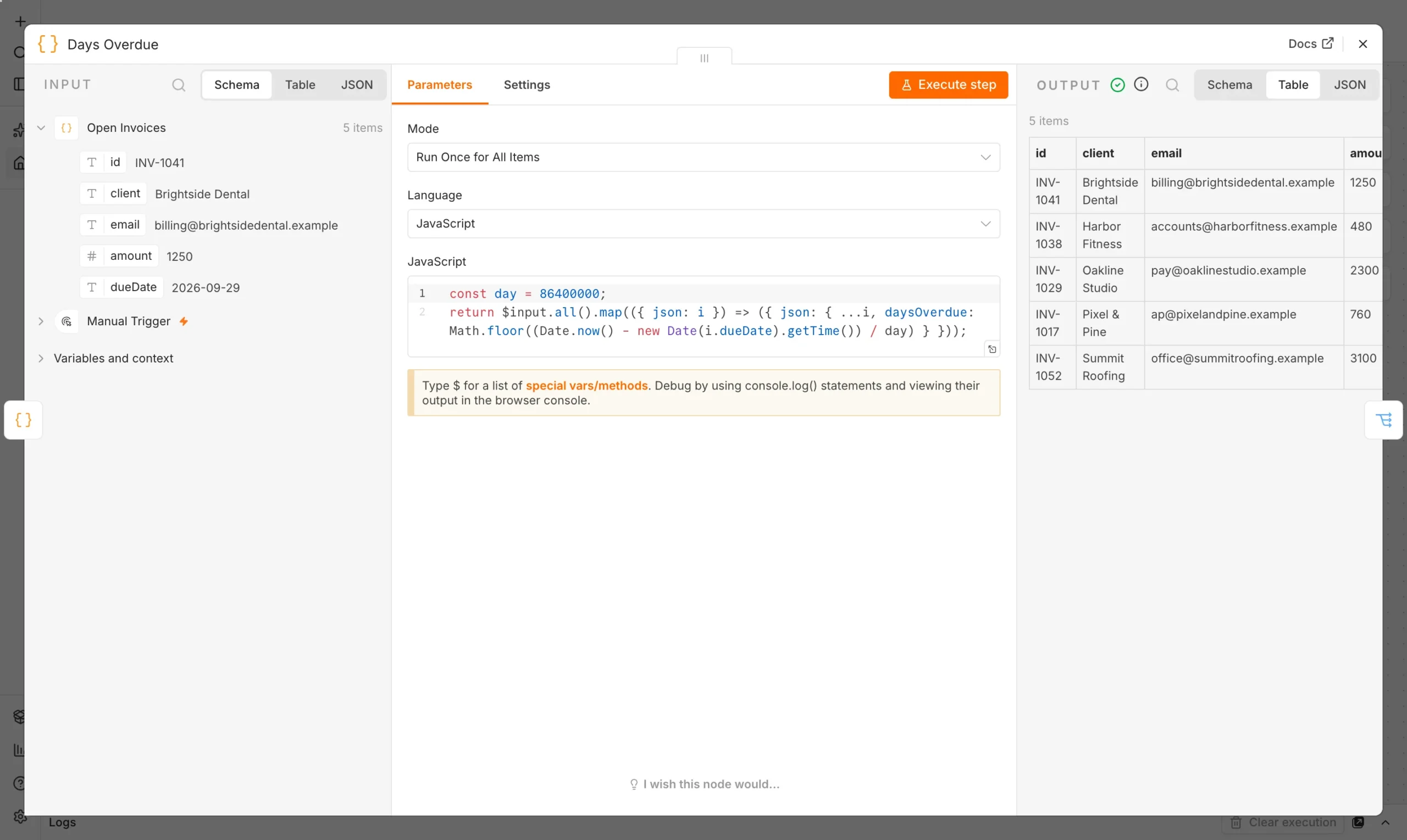
The Days Overdue node is the heart of the workflow. It turns a due date into a number, and the Switch node reads that number.
const day = 86400000;
return $input.all().map(({ json: i }) => ({
  json: { ...i, daysOverdue: Math.floor((Date.now() - new Date(i.dueDate).getTime()) / day) }
}));
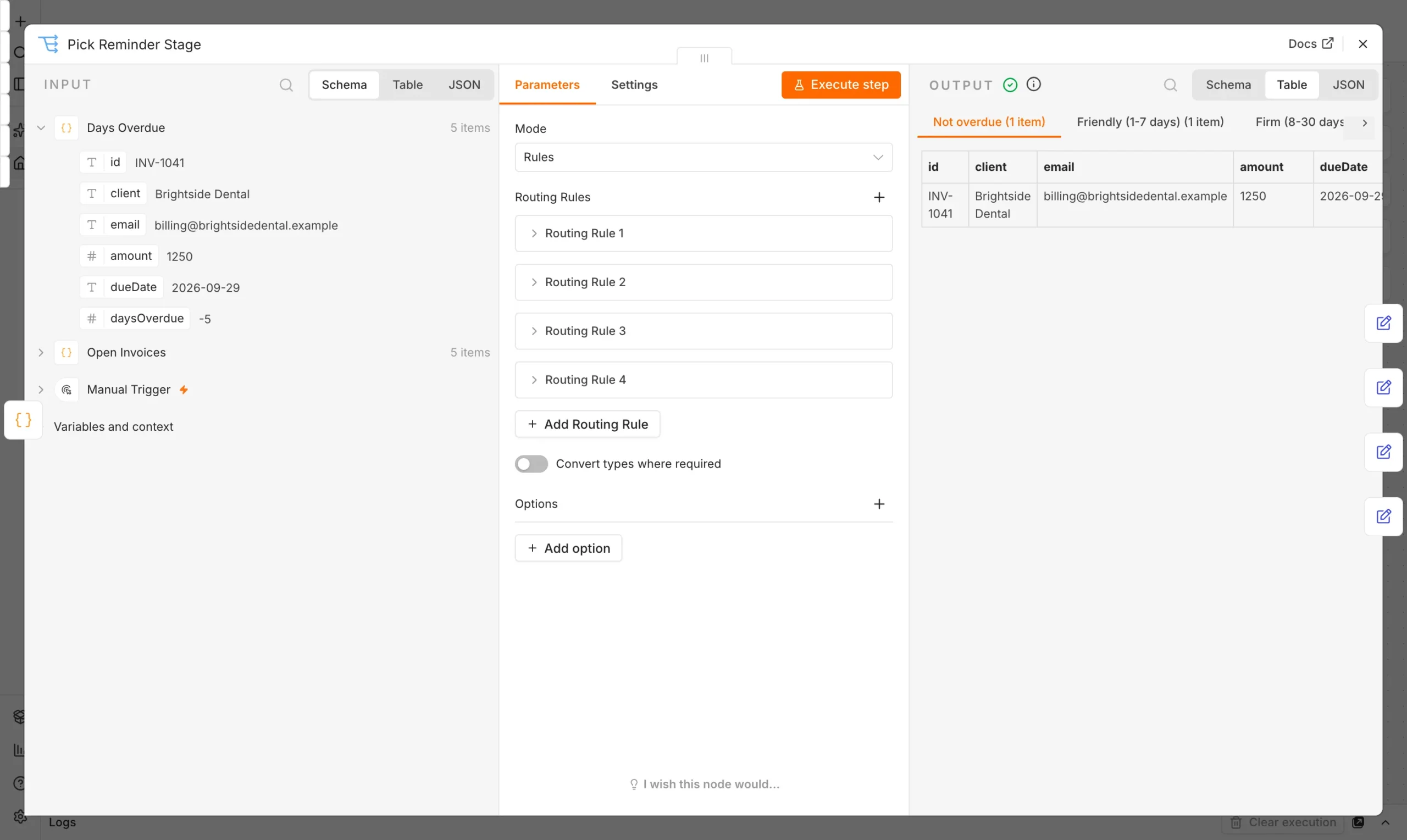
The Switch node has four rules. Rule one catches 0 days or less, rule two catches 1 to 7, rule three catches 8 to 30 and rule four catches anything above 30. Each rule gets its own named output.
What happened when we ran it
We executed the workflow on our local n8n install with five sample invoices. Dates are calculated from the day of the run, so the stages below reflect that day.
| Invoice | Client | Amount | Days overdue | Stage |
|---|---|---|---|---|
| INV-1041 | Brightside Dental | $1,250 | not due (5 days left) | Skip |
| INV-1038 | Harbor Fitness | $480 | 3 | Friendly |
| INV-1029 | Oakline Studio | $2,300 | 12 | Firm |
| INV-1052 | Summit Roofing | $3,100 | 21 | Firm |
| INV-1017 | Pixel & Pine | $760 | 34 | Final |
For these automated invoice reminders, one invoice was skipped, one got the friendly message, two got the firm one and one got the final notice. Each Set node produced a subject line and a message that names the client, invoice number, amount and due date.
This workflow writes the messages but does not send them. To send, add a Gmail or SMTP node after each Set node and map the client email field.
Make your automated invoice reminders safer
- Stop when paid. Check payment status before every send, or you will nudge someone who already paid.
- Run daily. Replace the Manual Trigger with a Schedule Trigger set to weekday mornings.
- Read from your real list. Point the first node at your sheet, database or accounting export, keeping the same field names.
- Review the final notice. Have a person approve the last stage before it goes out.
If invoices also need sign-off before they are sent, see our invoice approval workflow with approve and reject buttons.
What to put in each reminder
A reminder gets paid faster when the reader can act without searching for anything. Keep every message short and include the same core facts.
- Invoice number and amount. Both belong in the subject or first line.
- The due date. State it plainly, and never guess what the client remembers.
- A payment link or bank details. Remove every extra step between reading and paying.
- One contact. Give a real person to reply to if there is a dispute.
Change only the tone between stages. The facts stay identical, so clients never feel the message came from a different company.
Frequently asked questions
How many automated invoice reminders should I send?
Three stages work well: a friendly nudge in the first week, a firm reminder up to day 30, and a final notice after that.
Can n8n send the reminders automatically?
Yes. Add a Gmail or SMTP node after each message node and put the workflow on a Schedule Trigger.
Do automated invoice reminders need a paid tool?
No. It uses built-in n8n nodes and runs on the free Community Edition.