Automate Lead Scoring in n8n: Build a 100-Point Scoring Workflow
You can automate lead scoring in n8n with a plain rules workflow: no CRM add-on, no AI and no code you cannot read. Ours scores each lead from 0 to 100, then sends hot leads to sales, warm leads to a nurture list and cold leads to the newsletter. We built it on a local n8n install and ran it on eight sample leads.
- Eight sample leads were scored in one click: 4 hot, 2 warm and 2 cold.
- Ten simple rules add or remove points, and the score is capped between 0 and 100.
- It runs on free n8n Community Edition with no paid apps.
- Swap the sample node for a form, sheet or CRM trigger to use it with real leads.
How to automate lead scoring with simple rules
Lead scoring gives every lead a number, so your team knows who to call first. Rule-based scoring works well when you already know what a good customer looks like. Each rule adds or removes points, and the total is capped between 0 and 100.
| Signal | Points |
|---|---|
| Senior title (VP, Director, Head, CEO, Founder) | +25 |
| Company size 50 to 1,000 people | +20 |
| Company size over 1,000 | +15 |
| Company size 10 to 49 | +10 |
| Target industry (SaaS, logistics, agency, finance) | +10 |
| Source: demo request | +30 |
| Source: webinar | +15 |
| Source: newsletter signup | +5 |
| Viewed the pricing page twice or more | +15 |
| Free email address (Gmail, Yahoo) | -10 |
We treat 70 and above as hot, 40 to 69 as warm, and anything lower as cold. These weights are our example. Change them to match the customers you actually win.
Build the lead scoring workflow in n8n
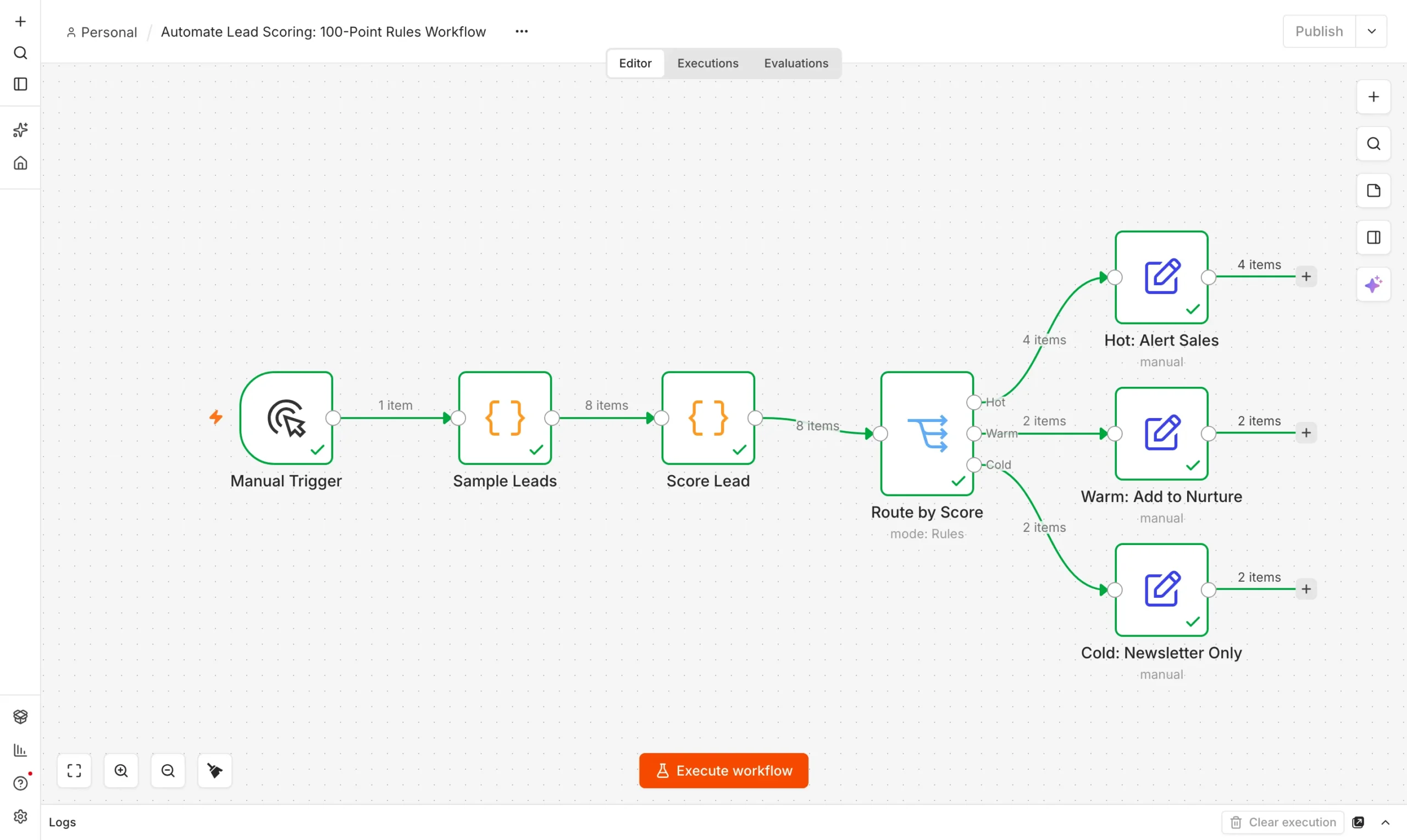
You only need n8n running. If you have not installed it yet, follow our guide to using n8n for free. To automate lead scoring, the workflow has four parts.
Lead source
A Manual Trigger and a Code node that returns eight sample leads.
Trigger
Score Lead
A Code node applies the rules and outputs a score.
Score
Route by Score
A Switch node sends each lead to Hot, Warm or Cold.
Route
Take action
Three Set nodes write the next step for each tier.
Act
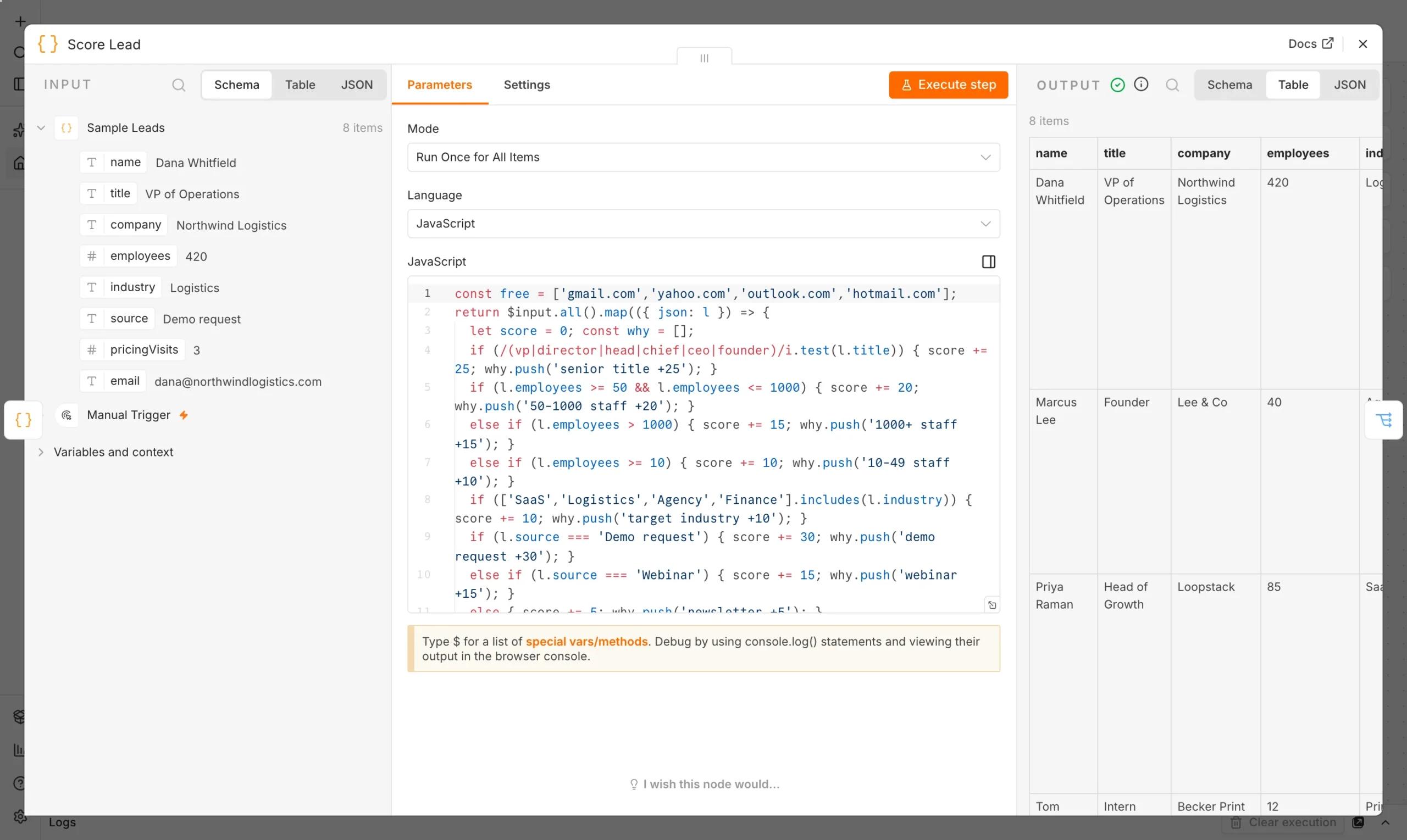
The scoring lives in one Code node. It reads each lead, adds points and returns the same lead with a new score field. Here is the core of it:
const free = ['gmail.com','yahoo.com','outlook.com','hotmail.com'];
return $input.all().map(({ json: l }) => {
  let score = 0;
  if (/(vp|director|head|chief|ceo|founder)/i.test(l.title)) score += 25;
  if (l.employees >= 50 && l.employees <= 1000) score += 20;
  else if (l.employees > 1000) score += 15;
  else if (l.employees >= 10) score += 10;
  if (['SaaS','Logistics','Agency','Finance'].includes(l.industry)) score += 10;
  if (l.source === 'Demo request') score += 30;
  else if (l.source === 'Webinar') score += 15;
  else score += 5;
  if (l.pricingVisits >= 2) score += 15;
  if (free.includes(l.email.split('@')[1])) score -= 10;
  return { json: { ...l, score: Math.max(0, Math.min(100, score)) } };
});
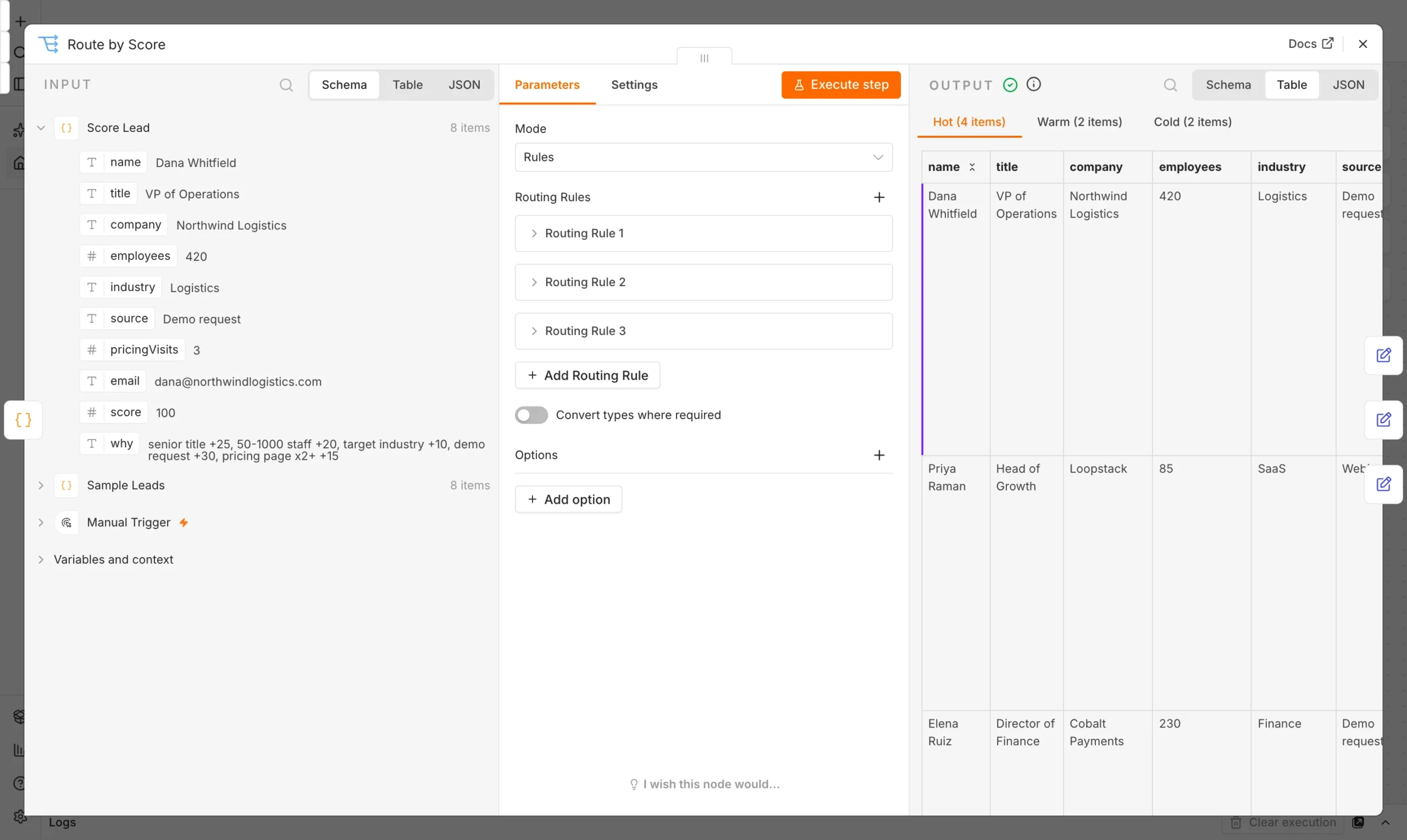
Next comes a Switch node with three rules: score of 70 or more is Hot, 40 or more is Warm, and below 40 is Cold. Name each output so the canvas stays readable.
What happened when we ran it
To test how we automate lead scoring, we clicked Execute workflow on our local n8n install. Eight sample leads went in, and every node finished with a green check. The scores below come straight from that run. The people are made up.
| Lead | Score | Route |
|---|---|---|
| Dana Whitfield, VP of Operations | 100 | Hot |
| Priya Raman, Head of Growth | 85 | Hot |
| Elena Ruiz, Director of Finance | 85 | Hot |
| Sofia Marchetti, CEO | 75 | Hot |
| Ken Watanabe, Analyst | 55 | Warm |
| Marcus Lee, Founder | 50 | Warm |
| Tom Becker, Intern | 15 | Cold |
| Jake Owens, Student | 0 | Cold |
That gave four hot leads, two warm and two cold. Ken is the interesting one. An analyst title earns nothing, yet he lands in warm because he works at a large finance company, joined a webinar and viewed pricing twice. Behavior can outweigh title.
Tune your lead scoring rules
- Start small. Five to seven rules are easier to trust than twenty.
- Check against real deals. Compare scores with the leads that became customers, then adjust the weights.
- Keep the reason. Store why a lead scored what it did, so sales can question the number.
- Go live in one swap. Replace the sample node with a form, sheet or CRM trigger, and replace each Set node with Slack, email or a CRM update.
Once scoring works, pair it with an automated lead follow-up system. For more ways to fill the top of the funnel, see how to generate sales leads.
Frequently asked questions
What is the easiest way to automate lead scoring?
Use a rules workflow. A Code node adds points for signals you trust, and a Switch node routes each lead by score. It needs no AI and no paid add-on.
Do I need AI or a CRM to score leads in n8n?
No. Our workflow uses only built-in n8n nodes. A CRM is useful later for storing scores, but the scoring itself runs without one.
How do I automate lead scoring with real leads?
Swap the Sample Leads node for a webhook, form, Google Sheets or CRM trigger, then keep the same field names so the scoring code still works.