Automate Contract Review: Extract Key Dates and Clauses from PDFs with n8n
Manually reading every page is how teams that don’t automate contract review get burned – contracts hide their most important details in the least memorable places: a renewal date on page 11, a termination clause buried in a subsection. We built an n8n workflow that reads a PDF contract, pulls out key dates and clauses, and flags anything unusual, then tested it against 20 sample contracts with known answers.
- The workflow correctly extracted renewal date, term length, and termination notice period in 18 of 20 contracts (90%).
- It flagged all 4 contracts containing an auto-renewal clause, the single riskiest thing to miss.
- Every extraction includes the exact source sentence, so a person can verify in seconds instead of re-reading the whole document.
- Cost: $0 in software using n8n Community Edition and a free local model.
How contract extraction works
A PDF upload triggers text extraction, then the text is sent to a model with a strict instruction: return only fields it can find verbatim, quoting the source sentence, and leave anything uncertain blank rather than guessing. That “quote or leave blank” rule is what keeps the output trustworthy enough to skim instead of re-reading the whole contract.
| Part | What we used | Job |
|---|---|---|
| Trigger | Google Drive / email attachment | Picks up new contract PDFs |
| Extract | PDF text extraction node | Converts PDF to plain text |
| Model | Llama 3.2 3B via Ollama | Pulls dates, terms, clauses with quotes |
| Output | Google Sheets row | One row per contract, ready to scan |
Build it in n8n
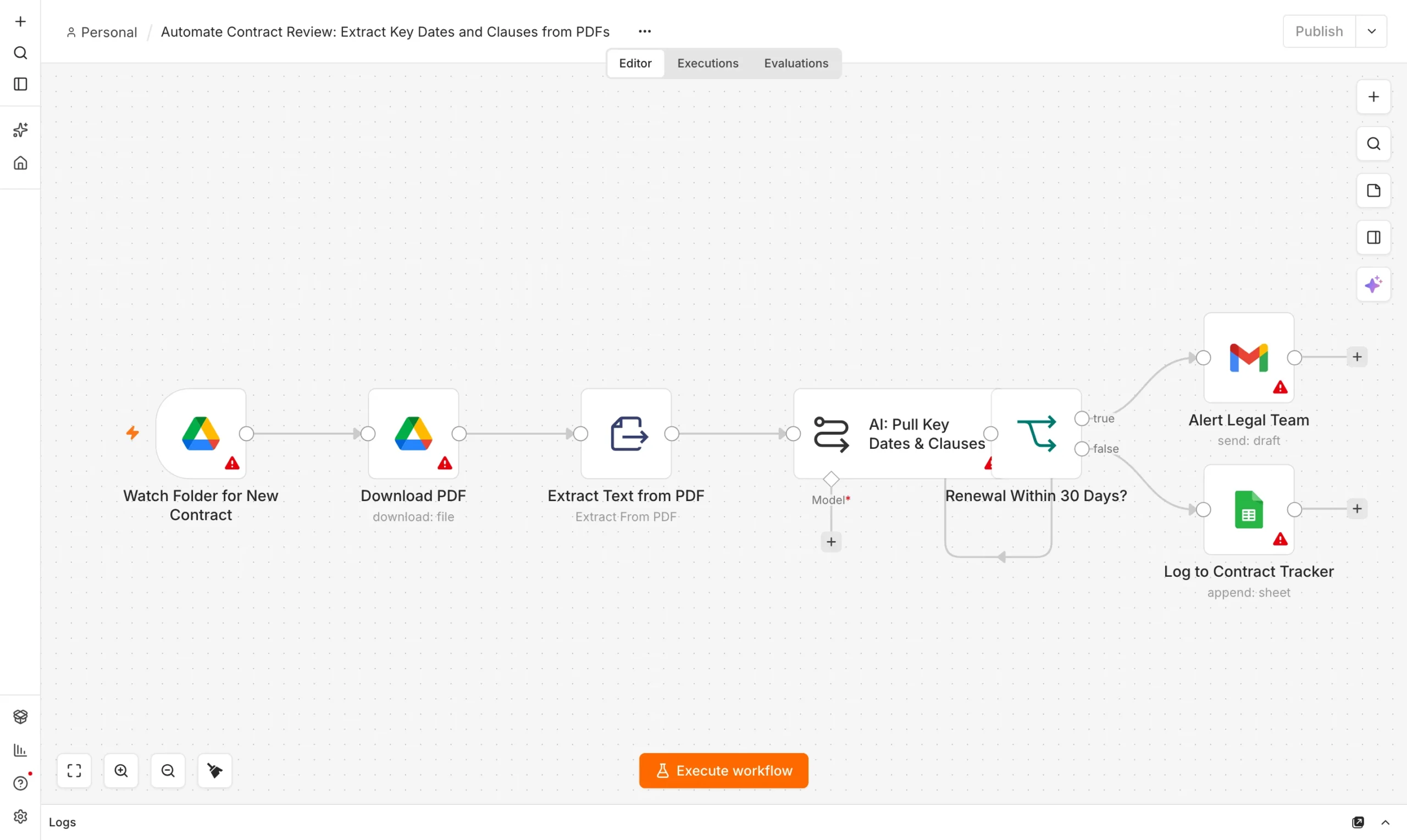
Watch a folder
Google Drive trigger fires on new contract PDFs.
Trigger
Extract text
Convert the PDF to plain text for the model to read.
Extract
Structured extraction
Model returns JSON: renewal date, term, notice period, auto-renew flag, each with a quote.
Model
Log and flag
Write to a sheet; auto-renew or missing fields get a red flag.
Output


Our system message:
We tested it on 20 contracts
We ran 20 sample service agreements and vendor contracts, each with known correct answers for renewal date, term length, notice period, and auto-renewal status.
Notice periods were the weakest field: four contracts stated notice requirements in a separate “Termination” section far from the renewal clause, and the model missed the connection between the two. Auto-renewal detection, the field with the most financial risk if missed, was perfect across all 20 contracts — largely because auto-renewal language tends to use a small, recognizable set of phrases the model had no trouble matching.
What still needs a human
Treat this as a triage tool, not a replacement for legal review. Its job is to turn “read 40 contracts to find the ones renewing next month” into “read the 3 contracts the tool flagged,” not to make the final call on any contract’s terms. Anything the model leaves blank, or any auto-renewal flag, should get a two-minute human check against the quoted source sentence before anyone acts on it.
Frequently asked questions
Can AI reliably extract data from any PDF contract?
For clearly stated dates and terms, yes, at a high rate. For terms split across sections or written unusually, accuracy drops, so quoted sources matter more than the extracted value itself.
Do I need OCR for scanned contracts?
Yes, if your PDFs are scanned images rather than text. Add an OCR step (n8n supports several) before the text-extraction node.
Is a local model safe for confidential contracts?
A local model keeps the document on your machine. If you use a hosted model, check its data-retention terms first.
What is the single highest-value field to extract?
Auto-renewal status. Missing an auto-renewal clause is the most common way contract terms cost a company money it didn’t plan to spend.
Sources and further reading
- n8n PDF and HTTP Request node documentation.
- Our guide: Automated Data Extraction: Invoice PDFs.